Contact@prince2training.co.uk
 01344203999




 Back
Back


Table of Content

13-Jun-2026

Veronica Davis
Managing a project without clear visibility into progress can lead to confusion, missed deadlines, and unexpected scope changes. Teams often struggle to understand whether their efforts are truly moving the project closer to completion. This is where a Burn Up Chart becomes valuable, as it helps teams clearly track completed work against the overall project scope.
It is widely used in Agile and Project Management because it provides better visibility into project performance and scope changes. In this blog, you will learn what is a Burn Up Chart, why teams use it, how to create one effectively, and more. Let's begin!
What is a Burn Up Chart?
A Burn Up Chart refers to a visual tool used in Agile Project Management to track project progress over time. It shows how much work has been completed compared to the total amount of work planned for a project or sprint. This helps teams measure performance and monitor progress more effectively.
A Burn Up Chart typically includes two lines: one representing the total project scope and the other showing completed work. By comparing these lines, teams can easily identify progress, estimate remaining work, and track scope changes throughout the project lifecycle.

Why Use a Burn Up Chart?
A Burn Up Chart is more than just a progress tracking tool. It helps teams improve visibility, monitor scope changes, and make better project decisions. Let's look at some key reasons why Agile and Scrum teams use a Burn Up Chart:
a) Clearly Shows Project Progress: A Burn Up Chart provides a simple visual view of completed work against the total project scope, making progress easy to understand.
b) Supports Better Forecasting: Teams can estimate project or sprint completion timelines more accurately by analysing the pace of completed work.
c) Highlights Scope Changes: Burn Up Charts clearly display changes in project scope, helping teams identify and manage scope creep before it affects delivery.
d) Helps Detect Issues Early: Burn Up Charts make it easier to identify delays or slower progress early, allowing teams to take corrective action quickly.
e) Improves Transparency: Since the Burn Up Chart is simple and easy to read, it keeps teams, stakeholders, and clients informed about project progress and performance.
How to Create a Burn Up Chart?
Creating a Burn Up Chart helps teams track project progress clearly and measure completed work against the overall project scope. By following the right steps, teams can improve planning, monitor performance, and identify scope changes effectively throughout the project lifecycle. Let's look at the steps below:
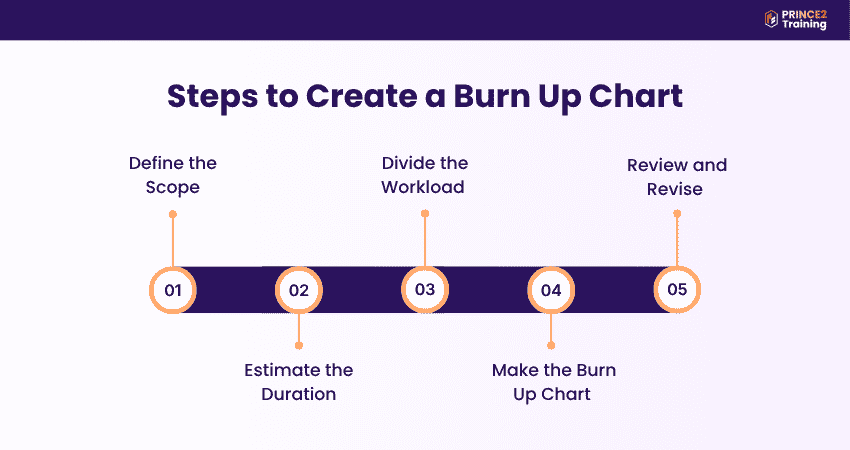
1) Define the Scope
Begin by identifying all the tasks, features, and deliverables required to complete the project. These tasks form the product backlog and provide a clear understanding of the total work planned. Defining the scope early helps teams stay organised, set realistic expectations, and minimise the risk of scope creep during the project. A clearly defined scope ensures that all stakeholders have a shared understanding of project requirements.
2) Estimate the Duration
Once the tasks are identified, estimate how many sprints will be needed to complete the work. In Agile projects, sprints usually last between 2 and 4 weeks and are kept consistent throughout the project. Estimating the duration helps teams create a project timeline and forecast expected completion dates accurately. Accurate time estimation supports better planning and improves delivery predictability.
3) Divide the Workload
Then, estimate the effort needed for each task using story points, hours, or workload estimates. This helps teams understand the total amount of work involved and distribute responsibilities effectively among team members. Also, proper workload planning improves resource management and team productivity. Balanced workload distribution ensures efficient use of team capacity and reduces bottlenecks.
4) Make the Burn Up Chart
Set up the Burn Up Chart by placing time on the horizontal axis and work units on the vertical axis. Add one line to represent the total project scope and another line to show completed work overtime. As the project progresses, the Burn Up Chart provides a clear visual representation of team performance and project progress. This visual clarity helps teams quickly assess progress and identify any deviations.
5) Review and Revise
A Burn Up Chart should be updated consistently throughout the project to maintain accuracy. As tasks are completed or project requirements change, the Burn Up Chart should reflect those updates immediately. Regular reviews help teams identify delays, monitor scope changes, and make informed decisions to keep the project on track.
Improve Agile project planning, collaboration, and delivery performance with the PRINCE2 Agile® Foundation and Practitioner (Version 2) Training – Sign up now!
Interpreting Burnup Charts
Interpreting a Burnup Chart involves analysing the patterns shown by the progress and scope lines. A steady upward movement in the completed work line usually indicates that the team is progressing consistently and working according to schedule. Consistent progress reflects effective planning and smooth team execution.
Changes in the total work line often represent scope changes, such as new tasks being added or project requirements being updated. On the other hand, a flat completed work line may indicate stalled progress caused by blockers, delays, or unresolved issues. Identifying these patterns early helps teams take corrective action and keep the project on track. Understanding these trends enables teams to respond proactively and maintain project momentum.
Example of Burnup Chart
Burn Up Charts are widely used in Agile projects across different industries to track progress and monitor completed work. While software development teams use them to measure feature completion during sprints, marketing teams often use them to track campaign activities against the total planned workload.
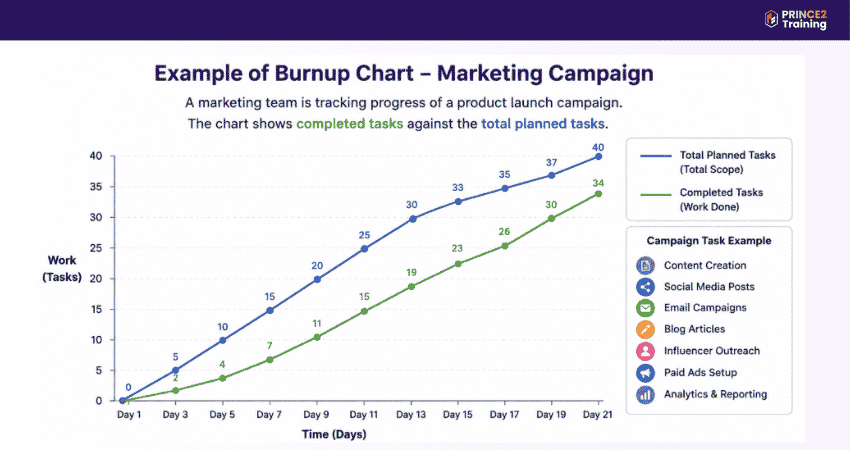
For example, the image above shows a marketing team using a Burn Up Chart to track tasks for a product launch campaign, such as content creation, social media promotions, and email campaigns. By comparing completed tasks with the total planned tasks, the team can clearly visualise progress, identify delays, and monitor scope changes throughout the campaign.
Build flexible Project Management skills for evolving business environments with the PRINCE2 Agile® Foundation (Version 2) Training now!
What is the Difference Between a Burn Up Chart vs a Burn Down Chart?
Burn Up Charts and Burn Down Charts are both popular Agile Project Management tools used to track project progress. Although they may sound similar, they work differently and provide different insights into project performance and workload tracking. Let's look at the differences between Burn Up vs Burn Down Chart below:
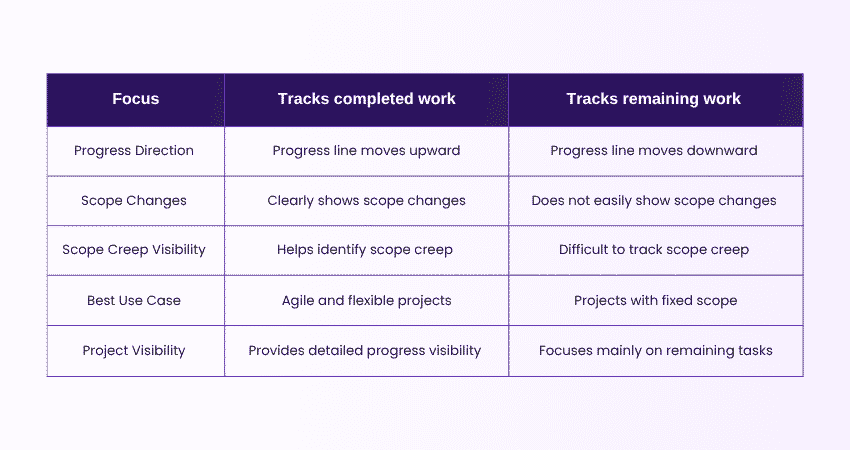
A Burn Up Chart focuses on the amount of work completed over time, making it easier for teams to track achievements and monitor changes in project scope. It is useful in Agile projects where requirements and priorities may change during the project lifecycle.
In contrast, a Burn Down Chart tracks the amount of work left to complete. It works best for projects with a fixed scope and stable requirements. However, since it does not clearly display scope changes, teams may find it harder to identify scope creep or unexpected project adjustments.
Conclusion
A Burn Up Chart is a valuable Agile Project Management tool that helps teams track completed work, monitor scope changes, and improve project visibility. By understanding how it works and how to create one effectively, teams can make better decisions, identify issues early, and keep projects moving steadily towards successful completion.
Build essential Project Management skills with the PRINCE2 Training – Sign up today!
Frequently Asked Questions
What are the Components of an Agile Burn Up Chart?
The components of an Agile Burn Up Chart are:
a) X-axis: Shows the project timeline
b) Y-axis: Represents the total amount of work
c) Total Work Line: Displays the overall project scope
d) Completed Work Line: Tracks completed work over time
When Should I Use a Burn Up Chart?
A Burn Up Chart is best used in Agile projects with hanging requirements. It helps teams clearly track completed work separately from changes in the project scope. This makes it easier to identify real project progress, monitor scope creep, and understand whether the project is advancing over time.
What Does a Good Burn Up Chart Look Like?
A good Burn Up Chart provides a clear visual view of project progress and overall scope. It includes a clean timeline on the X-axis, total work on the Y-axis, a visible scope line, and a steadily rising completed work line. Together, these elements help teams easily track progress, scope changes, and remaining work.



 Continue Browsing