Contact@prince2training.co.uk
 01344203999




 Back
Back


Table of Content


24-Sep-2026

Gary Moore
Imagine managing a project where everyone can instantly see what needs to be done, what is in progress, and what has already been completed. This level of visibility provides a shared view of project activities. This is exactly what a Scrum Board helps teams achieve.
As a core tool in Agile Project Management, a Scrum Board provides a clear visual representation of work, improving transparency, collaboration, and productivity. In this blog, we explore what a Scrum Board is, how it works, and why it has become an essential tool for teams striving to deliver projects efficiently and successfully. So, let's get started!
What is a Scrum Board?
A Scrum Board is a visual Agile Project Management tool that helps teams plan, track, and manage tasks during a sprint. It displays prioritised tasks as cards that move through workflow stages, such as To Do, In Progress, and Done, giving the entire team a clear view of project progress. Its structure promotes transparency, collaboration, and accountability throughout the sprint.
Each card on a Scrum Board represents a work item selected for the current sprint, while the columns reflect the team's workflow. As tasks progress, the cards move across the board, making it easy to monitor task status, identify bottlenecks, and stay aligned with sprint goals. By providing real-time visibility into work, Scrum Boards help teams improve communication, maintain focus, and deliver value more efficiently.

Purpose of a Scrum Board
A Scrum Board is designed to give teams a clear visual overview of sprint tasks throughout a sprint. The following are the main purposes of using a Scrum Board:
1) Promotes Transparency:
A Scrum Board makes all sprint tasks visible to the entire team. Everyone can see what work is planned, what is currently being worked on, and what has been completed, promoting greater accountability and encouraging proactive problem-solving.
2) Improves Team Collaboration:
By displaying work in a shared space, Scrum Boards encourage communication and coordination among team members. Team discussions become more focused, especially when tasks are dependent on one another or require additional support.
3) Enhances Project Control:
A Scrum Board helps teams track progress in real-time and quickly identify bottlenecks or delays. This visibility enables the team to take corrective action early and keep sprint goals on track.
4) Simplifies Progress Tracking:
The visual layout of a Scrum Board makes it easy to understand task status at a glance. Team members, stakeholders, and new contributors can quickly grasp project progress without needing extensive explanations or complex reports.
How do Scrum Boards Work?
A Scrum Board organises and visualises work by dividing tasks into columns that represent different stages of a sprint workflow. Common columns include To Do, In Progress, In Review, and Done, while swimlanes (rows) may represent user stories, features, or work categories. This structure helps teams track progress and manage tasks efficiently throughout the sprint.
Each task is represented by a card that moves across the board as work progresses. Tasks begin in the To Do column, move to In Progress when work starts, shift to In Review for testing or approval, and finally reach Done once completed. This movement provides a real-time view of project status report and highlights any delays or bottlenecks.
Digital Scrum Boards further enhance collaboration by allowing team members to update tasks, add comments, and monitor progress from any location. They help teams:
1) Manage work seamlessly throughout the sprint lifecycle
2) Track sprint progress, dependencies, and bottlenecks in real time
3) Improve visibility and communication across distributed teams
4) Keep stakeholders informed about sprint status and outcomes
5) Support faster decision-making through up-to-date project information
Turn your project knowledge into project success with
PRINCE2® Practitioner Course
– Join now!
What is the Structure of a Scrum Board?
A Scrum Board, also known as a sprint board or Scrum task board, is organised into workflow stages that visually display workflow status, progress, and completion throughout a sprint.
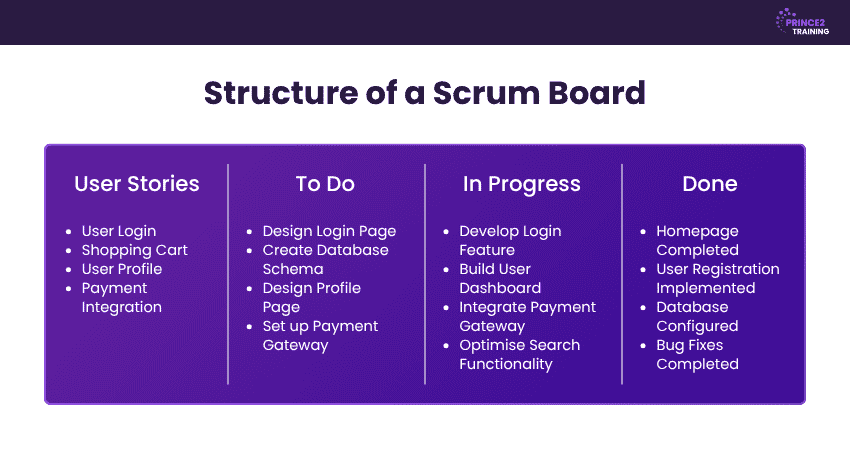
1) User Stories
User stories represent the features, requirements, or pieces of work that need to be completed during a sprint. They are typically broken down into smaller tasks, which are displayed as cards on the Scrum Board and serve as the foundation for organising work. Each user story reflects a specific value or outcome for the end user.
2) To Do
The To Do column contains tasks that have been selected for the sprint but have not yet been started. It acts as the team's work queue, helping members understand what needs to be completed and prioritise their workload accordingly.
3) In Progress
The In Progress column includes tasks that are actively being worked on by team members. As work begins, tasks move from the To Do column to this stage, providing visibility into ongoing activities and helping the team identify potential bottlenecks.
4) Done
The Done column contains tasks that have been fully completed and meet the agreed acceptance criteria. Once a task reaches this stage, it is considered finished for the sprint, allowing the team to track completed work.
Types of Scrum Boards
Scrum Boards can be broadly categorised into two types: Physical Scrum Boards and Online Scrum Boards. Both serve the same purpose of visualising work and tracking sprint progress, but they differ in how teams interact with them and the environments in which they are used. Let's check them in detail below:
Physical Scrum Board
A Physical Scrum Board is a tangible board, such as a whiteboard, wall chart, or noticeboard, where tasks are represented using sticky notes or cards. Team members manually move these cards across workflow columns as work progresses through the sprint. Physical boards are particularly effective for co-located teams because they encourage face-to-face communication and provide a constant visual reminder of sprint goals and progress.
Online Scrum Board
An Online Scrum Board is a digital version hosted within Project Management software. It allows team members to update tasks, track progress, and collaborate in real time regardless of their location. Online boards are especially valuable for remote and distributed teams, as they provide instant visibility, automatic updates, and access to supporting documents, comments, and project data from anywhere.
What are the Components of a Scrum Board?
A Scrum Board is made up of several key components that work together to organise, track, and manage sprint tasks. Understanding these components enables teams to use these boards effectively and improve collaboration throughout the sprint. The following are its major components:
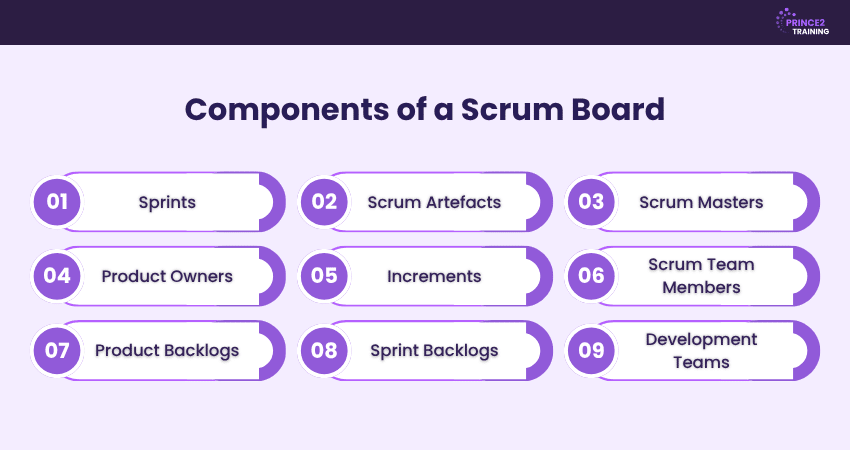
1) Sprints
Sprints are fixed-length work cycles during which Scrum teams complete a defined set of tasks. The Scrum Board is used to track progress throughout the sprint, helping teams stay focused on achieving sprint goals.
2) Scrum Artifacts
Scrum Artifacts are the key pieces of information that provide transparency into the project. They include the Product Backlog, Sprint Backlog, and Increments, all of which are represented and monitored through the Scrum Board.
3) Scrum Masters
The Scrum Master facilitates the Scrum process and ensures the team follows Agile principles and Scrum practices. They use the Scrum Board to monitor workflow, remove obstacles, and support continuous improvement.
4) Product Owners
The Product Owner manages the Product Backlog and ensures the team works on the highest-priority tasks. They collaborate with stakeholders, define requirements, and use the Scrum Board to monitor sprint progress and prioritise upcoming work.
5) Increments
An Increment is the completed and usable work delivered at the end of a sprint. It represents the combined outcome of all finished Product Backlog items and must meet the team's Definition of Done before it can be considered complete.
6) Scrum Team Members
Scrum team members are the professionals responsible for completing the work during each sprint. They collaborate closely, update task statuses on the Scrum Board, and work together to deliver the sprint goal.
7) Product Backlogs
The Product Backlog is a prioritised list of features, enhancements, bug fixes, and requirements for the product. Items from the Product Backlog are selected for inclusion in upcoming sprints and are reflected on the Scrum Board.
8) Sprint Backlogs
The Sprint Backlog contains the Product Backlog items selected for the current sprint, along with the tasks needed to complete them. It forms the basis of the Scrum Board and guides the team's daily work throughout the sprint.
9) Development Teams
The development teams are the cross-functional professionals who design, build, test, and deliver product increments. The Scrum Board helps them collaborate effectively, track task status, and maintain visibility into sprint progress.
Prepare for future project success with PRINCE2® Foundation Course – Register now!
Advantages of Scrum Boards
Scrum Boards offer much more than a visual way to organise tasks. They help teams improve transparency, streamline workflows, and stay focused on achieving sprint goals. Below are the key advantages of using Scrum Boards:
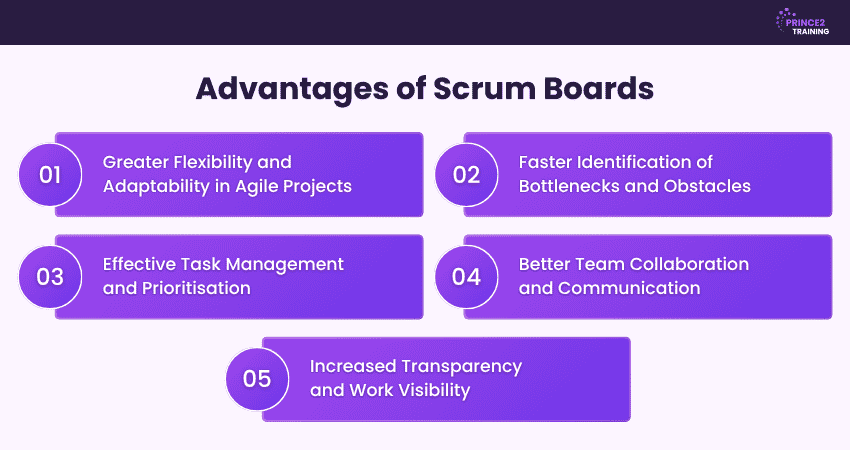
1) Greater Flexibility and Adaptability in Agile Projects
Scrum Boards support Agile principles by allowing teams to respond quickly to changing priorities and requirements. As tasks progress or new information emerges, teams can adjust their workflow while maintaining focus on sprint goals. This flexibility enables teams to adapt to customer feedback, evolving business needs, and unexpected challenges without disrupting the entire project. As a result, teams can deliver value while remaining responsive to change.
2) Faster Identification of Bottlenecks and Obstacles
Because tasks are visually tracked across different workflow stages, Scrum Boards make it easy to spot delays, blocked tasks, or overloaded team members. Team members and Scrum Masters can quickly identify where work is slowing down and take corrective action before issues affect sprint outcomes. This visibility helps reduce downtime, improve workflow efficiency, and ensure tasks continue progressing towards completion.
3) Effective Task Management and Prioritisation
Scrum Boards help teams organise tasks based on priority and sprint objectives. By clearly showing what needs to be done, what is in progress, and what has been completed, they support better planning and efficient workload management. Teams can focus on high-value activities, balance workloads, and ensure critical tasks receive attention first. This structured approach contributes to improved productivity and more successful sprint deliveries.
4) Better Team Collaboration and Communication
A shared Scrum Board keeps everyone aligned on project status and responsibilities. Team members can easily understand how their work connects with others, encouraging collaboration, knowledge sharing, and effective communication throughout the sprint. The board serves as a central source of information, reducing misunderstandings and helping teams coordinate efforts. This has led to stronger teamwork and faster problem resolution.
5) Increased Transparency and Work Visibility
Scrum Boards provide a real-time view of sprint progress for team members and stakeholders alike. This transparency ensures everyone has a clear understanding of the work being completed and the sprint's overall progress. Stakeholders can monitor developments without requiring frequent status updates, while team members gain greater awareness of project priorities, dependencies, and potential risks. This helps build trust and keeps everyone focused on achieving sprint goals.
Develop Agile project expertise with PRINCE2 Agile® Foundation (Version 2) Course – Register now!
What are the Drawbacks of a Scrum Board?
While Scrum Boards provide valuable visibility and structure for Agile teams, they are not without limitations. Teams must understand and address these drawbacks to ensure the board remains an effective tool for managing work and achieving sprint objectives. Here are the drawbacks you need to be aware of:
1) Higher Initial Setup Costs
Implementing a Scrum Board, particularly a digital one, can involve upfront costs related to software licences, integrations, and team training. Organisations may also need to invest time in configuring workflows, defining processes, and onboarding team members. For smaller teams or businesses with limited resources, these initial investments can present a challenge.
2) Dependence on Daily Meetings
Scrum Boards are effective when supported by regular Scrum events, especially daily stand-up meetings. These meetings help keep task statuses accurate and ensure everyone remains aligned on priorities and progress. If team members fail to participate consistently or provide updates, the board can quickly become outdated, reducing its usefulness as a decision-making tool.
3) Risk of Scope Creep
Agile projects are designed to accommodate change, but this flexibility can sometimes lead to scope creep. New tasks, requirements, or stakeholder requests may be introduced during a sprint, potentially disrupting planned work. Without strong backlog management and clear prioritisation, teams may struggle to maintain focus on sprint goals and delivery timelines.
4) Challenging Learning Curve
For teams unfamiliar with Agile methodologies, understanding how to use a Scrum Board effectively can take time. Team members must learn Scrum concepts, roles, workflows, and best practices while adapting to a collaborative way of working. This learning period can temporarily impact productivity until the team becomes comfortable with the framework.
5) Requires Strong Commitment from the Entire Team
The success of a Scrum Board depends on active participation from everyone involved in the sprint. Team members must regularly update task statuses, communicate blockers, and collaborate with colleagues to maintain an accurate view of progress. If individuals fail to engage consistently, transparency decreases, making it harder for the team to identify issues and manage the sprint effectively.
Scrum Board vs Kanban Board
While Scrum Boards and Kanban boards are both visual tools used in Agile Project Management, they serve different purposes and follow distinct approaches to managing work. Understanding these differences helps teams choose the method that aligns with their workflow and project requirements.
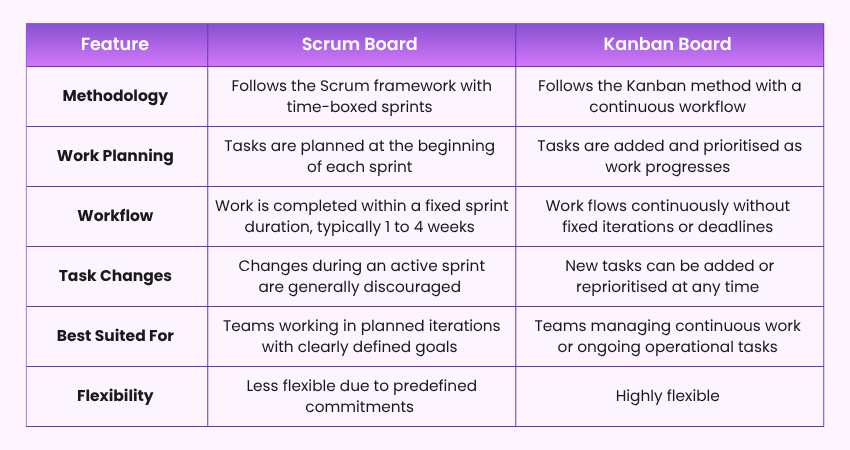
The primary difference between a Scrum Board and a Kanban board is that a Scrum Board is designed to support sprint-based work with fixed goals and timelines, whereas a Kanban board supports a continuous flow of work with an emphasis on workflow optimisation and flexibility. Both provide visibility into progress, but they achieve it through different Agile practices.
Conclusion
A Scrum Board is a powerful Agile tool that helps teams visualise work, track progress, and manage tasks throughout a sprint. By providing clear visibility into task status, priorities, and workflow, it promotes transparency, collaboration, and accountability across the team. Whether physical or digital, a well-maintained board enables teams to adapt to changing requirements and stay focused on delivering sprint goals. Understanding how it works can help organisations improve project efficiency, strengthen team communication, and achieve more successful Agile outcomes.
Prepare to lead successful projects by enhancing your knowledge with the
PRINCE2 Training
– Register now!
Frequently Asked Questions
Who is Responsible for Managing the Scrum Board?
The Scrum Board is managed collectively by the Scrum Team. Team members update task statuses as work progresses, the Scrum Master ensures the board is used effectively and remains accurate, and the Product Owner monitors progress against sprint goals and priorities. Together, they keep the board current and transparent.
How are User Stories and Tasks Represented?
User stories and tasks are represented as cards or sticky notes on a Scrum Board. User stories describe features or requirements from the user's perspective, while tasks break the work into smaller, actionable steps. These cards move across workflow columns as progress is made, providing clear visibility into sprint activities.
How do We Use the Scrum Board During the Daily Stand-up?
During the daily stand-up (Daily Scrum), the Scrum Board is used to review task progress, discuss completed work, identify current priorities, and highlight blockers. Team members move task cards as needed and use the board to align on sprint goals, coordinate activities, and ensure everyone has visibility into the team's progress.



 Continue Browsing