Contact@prince2training.co.uk
 01344203999




 Back
Back


Table of Content

08-Sep-2026

James Smith
You’re midway through your project, and a technical issue pops up that no one had thought about. It’s not huge, but it can slow down everything. With that, deadlines will slip, the team will be frustrated, and now you will spend time solving a problem that could’ve been planned for. This kind of situation is more common than you think.
In fact, most project delays come from things that weren’t tracked or discussed early on, like risks, guesses, current problems, or task dependencies. That’s where RAID in Project Management comes in. It helps you list and track the key areas that can become the reason for such delays. In this blog, we’ll explain what RAID is, how to create a RAID log, and how to use it in your own projects. Let's dive in!
Table of Contents
1) What is RAID in Project Management?
2) The Four Components of RAID
3) How to Create a RAID Document?
4) Implementing RAID in Your Projects
5) Best Practices for Using RAID Successfully
6) Conclusion
What is RAID in Project Management?
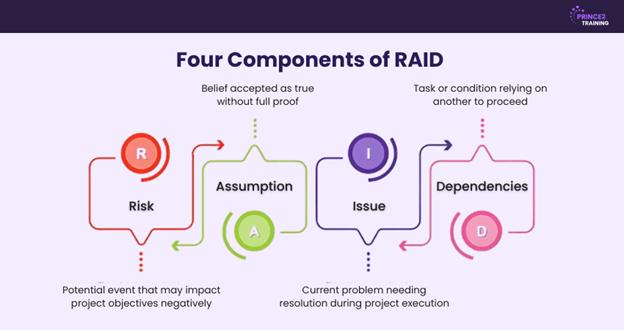
RAID in Project Management is a simple method that helps teams keep track of important things that can affect a project. It stands for Risks, Assumptions, Issues, and Dependencies. By writing these down in one place, Project Managers can plan better, avoid delays, and handle challenges more easily.
This method gives structure to project planning. For example, risks are things that might go wrong, such as a delay in receiving supplies. Assumptions are beliefs you make, like expecting a team member to be available. Issues are problems already happening, such as a missed deadline. Dependencies are tasks that rely on each other, like testing a product only after it has been built.

The Four Components of RAID
Now, let’s check what each component of RAID in Project Management refers to and defines:
1) Risks
Risks are potential events or situations that may negatively affect a project’s goals. They are actions that are capable of causing delays, added costs, or reduced quality if not addressed early. Risks can come from many sources, including:
1) Technological uncertainties
2) Limited resources
3) Market or economic fluctuations
4) Regulatory changes or natural disasters
Identifying risks usually involves brainstorming, reviewing past project data, or asking experts for their input. A good RAID log for risk will have:
1) A description of each potential risk
2) Its likelihood and impact
3) Mitigation strategies
4) A designated owner
2) Assumptions
Assumptions are things we believe to be true when planning a project, even though they’re not guaranteed. They form the basis for decisions and planning. But if an assumption turns out to be wrong, it can lead to serious problems. Some of the examples involve:
1) Assuming a stakeholder will approve quickly
2) Believing a certain tool or software will be available
3) Expecting a stable market or economy throughout the project
4) Trusting that team members will be available for the project’s full duration
Identify assumptions by reviewing project plans to spot hidden beliefs. Once found, you need to validate them through data, research, or expert advice. By doing so, you can:
1) Spot weaknesses in the plan
2) Reduce surprises later
3) Build flexibility into the schedule or budget
4) Prevent decision-making based on false expectations
3) Issues
Issues are problems that have already happened during the project. Unlike risks, which are potential problems, issues are current roadblocks that need immediate attention. It can be a missed deadline, a budget overrun, or a system failure. They can arise from:
1) Technical failures and changes in external conditions
2) Miscommunication within the team
3) Conflicting priorities
4) Lack of resources
The faster issues are recorded and addressed, the lower the long-term impact on the project. For that, your issue tracking should contain:
1) A brief description of the issue
2) Its impact on the project
3) The root cause (if known)
4) Remedial actions and responsible personnel
Learn how to organise and manage projects with our Introduction to Project Management Course – Register today!
4) Dependencies
Dependencies are the relationships between different project tasks. They show which tasks rely on others to be completed first. Managing these correctly is essential for planning and scheduling. The different types of dependencies are:
1) One task starts only after another finishes
2) Tasks that must run in parallel
3) Tasks that must begin at the same time to stay aligned
4) Tasks that can’t begin until an outside team delivers something
Poorly managed dependencies can lead to project bottlenecks. But with good coordination, clear timelines, and backup planning, you can avoid them. For that, you can try to:
1) Analyse the workflow carefully
2) Map out the task sequence
3) Use project management tools to visualise and track the progress
4) Regularly review and update project dependencies
How to Create a RAID Document?
Now that you know what RAID is, here is how you can create a document for it:
1) Schedule an Audit Meeting
Start by scheduling a meeting with key project stakeholders and team members. The purpose is to brainstorm and openly discuss potential RAID elements. This meeting encourages collaboration, diverse perspectives, and honest conversations about what might impact the project.
2) Identify RAID Elements
Use this session to identify and define each of the four RAID components. Risks the team foresees, Assumptions underlying the plan, Issues that have emerged already, and Dependencies that could affect progress. Get everyone’s perspective to create a robust and realistic RAID document.
3) Generate a RAID Log
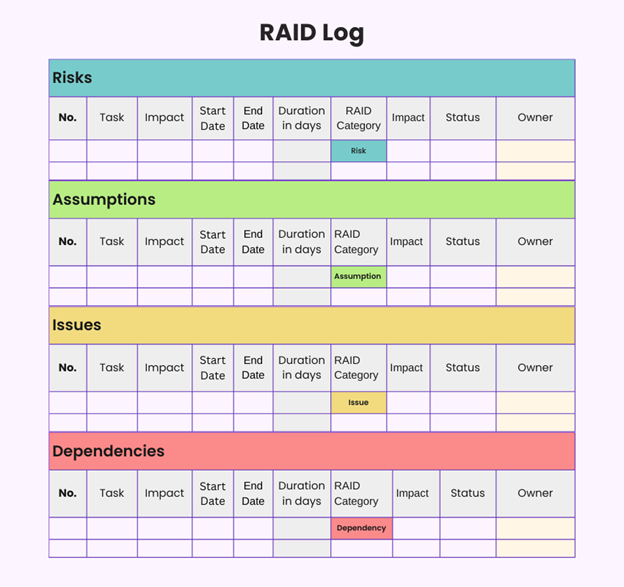
After identifying the RAID elements, organise them into a RAID log. It can be a table, spreadsheet, or done using any suitable Project Management tools. It needs to have a clear title, description, category from RAID, date of identification, person responsible, priority level, suggested solution and status (Open, In Progress, Resolved).
4) Share with Stakeholders
Once the RAID log is created, share it with all project stakeholders, team members, sponsors, and anyone else affected by or responsible for any actions. Clear communication and transparency improve team trust and ensure accountability across the board. You can also share the log via tools like Microsoft Project, Jira, or Trello.
5) Keep the Log Updated
A RAID log is not a one-time activity. It needs to be reviewed and updated regularly. As the project progresses, new risks may emerge, assumptions may be proven right or wrong, and dependencies or issues may shift. By keeping your RAID document updated, your team will always be ready to respond to project challenges with agility and confidence.
Learn to manage Agile projects with our PRINCE2 Agile® Foundation Training – Join immediately!
Implementing RAID in Your Projects
When embedded into day-to-day project activities, RAID becomes a powerful operational tool rather than a mere checklist. Here are the ways you can implement it:
Identifying and Managing Risks
Identifying and managing risks is a proactive process that helps you stay ahead of potential problems. The goal is not just to spot risks but to plan and act on them before they affect your project. Here are proven strategies to manage risks effectively:
1) Brainstorm with stakeholders to find risks early
2) Use a risk register to track likelihood, impact, and actions
3) Conduct a SWOT analysis to identify internal or external threats
4) Review past projects for recurring risks and lessons learned
5) Consult experts for insights into less obvious risks
6) Run risk workshops for deeper analysis and prioritisation
7) Monitor risks regularly and update your plans as needed
Assumptions and Their Impact
In RAID, assumptions are often overlooked but can be just as risky as known issues. Handling them requires a structured process of identification, validation, communication, and ongoing monitoring. Here is how to manage assumptions:
1) Identify assumptions within project plans and decisions
2) Validate them with data, research, or expert input
3) Document clearly with rationale and supporting evidence
4) Monitor regularly to catch changes or invalid assumptions
5) Communicate openly so all stakeholders are aligned
6) Update as needed when new information emerges
7) Plan for risks if assumptions fail
Best Practices for Using RAID Successfully
Here are some of the tried-and-true best practices for using RAID in Project Management:
1) Stakeholder Involvement
Involve stakeholders and team members in identifying and reviewing RAID elements. Their insights improve the quality of entries and build shared responsibility for managing risks and challenges.
2) Clear Communication
Make sure everyone on the project team understands what is in the RAID log, why it matters, and who is responsible for what. This improves alignment and reduces misunderstandings.
3) Proactive Monitoring
When you have recorded the RAID elements, you need to monitor them actively. Track progress on mitigation plans, validate assumptions regularly, and respond quickly to new issues or changes in dependencies.
4) Continuous Learning:
At project closure, review what worked and what didn’t in your RAID process. Document lessons learned so future projects can benefit from past experience and improve their approach to risk and issue management.
5) Regular Updates
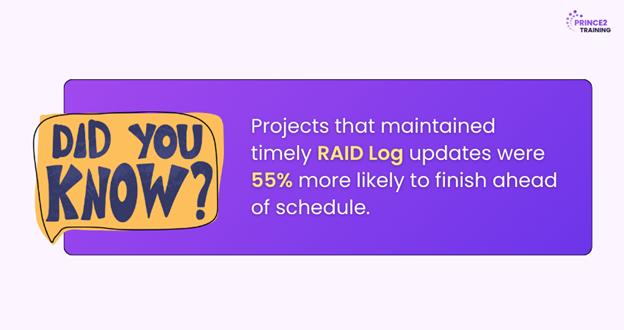
Keep the RAID log up to date. As projects evolve, new risks or dependencies may arise, and assumptions may change. Regular reviews, either like weekly or bi-weekly can ensure that the log reflects the current project landscape.
6) Use Technology
Leverage Project Management tools with built-in RAID templates, dashboards, and automated alerts. These tools make it easier to update logs, share changes, and maintain visibility across teams.
Conclusion
Success in projects depends on more than just preparation. It also requires the ability to handle unexpected challenges. When you know how to implement RAID in Project Management, project teams can shift from reactive firefighting to proactive leadership. With the right mindset, collaboration, and tools, it becomes a natural part of your project workflow.
Big projects need bold leaders. Become one with our PRINCE2 Training soon!
Frequently Asked Questions
What is RAID and RACI?
RAID stands for Risks, Assumptions, Issues, and Dependencies. It is used to track key project elements. RACI is a responsibility matrix, which elaborates to Responsible, Accountable, Consulted, Informed. It is used to clarify roles and responsibilities across tasks or decisions in a project.
Is RAID Used in Agile?
Yes. Agile teams can also use RAID. Even though Agile is flexible, RAID helps teams keep track of risks and issues in a simple, clear way. You can include RAID in sprint planning or review meetings to prevent slowing things down.
What is a RAID?
RAID in Project Management stands for Risks, Assumptions, Issues, and Dependencies. It is a structured method used to track these key elements during a project, helping managers anticipate challenges, reduce surprises, and improve overall project delivery.



 Continue Browsing