01344203999




 Back
Back


Table of Content

21-Sep-2026

Maria Thompson
Project dashboards may look polished and impressive, yet they can still conceal the issues that truly matter. That is where RAG (Red, Amber, Green) Status makes a difference. By using simple colour signals, it cuts through complexity and gives teams instant clarity on what needs attention. Instead of drowning in data, leaders can quickly see what is on track and what demands immediate action.
In this blog, we explore what RAG Status is, why it works so effectively, and how to implement it within real project environments. When used properly, RAG reporting becomes more than just colours on a slide; it becomes a shared language that drives accountability, sharper decisions and smoother delivery from start to finish.
What is RAG Status?
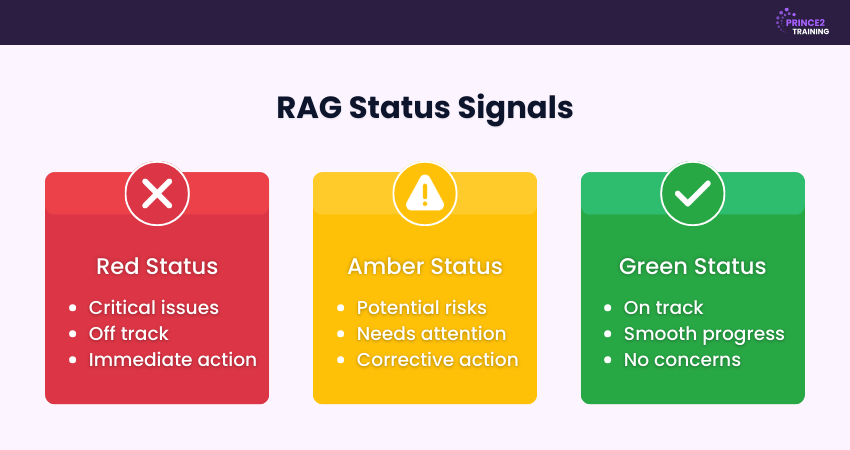
RAG (Red, Amber, Green) Status is a simple visual reporting system used in Project Management to show the overall health of a task, milestone or entire project. Each colour represents a different level of performance or risk, making it easy to understand status at a glance. Green indicates that work is progressing as planned, Amber highlights potential concerns that require attention, and Red signals serious issues that need immediate action.

RAG Status Signals
Now let's look at the various RAG Status signals and what they represent:
1) Red Status
Projects marked Red indicate a critical situation that threatens delivery. This status reflects a serious risk to project objectives and demands urgent corrective action. Immediate escalation to senior stakeholders is usually required to prevent further impact.
2) Amber Status
An Amber status highlights potential risks or obstacles that could affect progress. While not yet critical, proactive action is essential to prevent issues from escalating. Close monitoring and targeted adjustments help bring the project back within acceptable limits.
3) Green Status
Green projects are progressing as planned and remain on track. This status shows that performance is within agreed tolerances, with no significant risks affecting project delivery. Routine monitoring should continue to ensure stability is maintained.
What Affects the Reliability of RAG Status?
The reliability of RAG Status depends largely on the quality and accuracy of the data being used to determine a project's current position. Several factors can influence its effectiveness:
1) Data Accuracy
RAG Status relies on timely and accurate information. Incomplete, outdated or incorrect data can lead to misleading interpretations and unreliable status ratings. Project Managers must ensure that the reporting data truly reflects the project's real-time condition.
2) Subjectivity
Personal judgment can affect how a RAG Status is assigned, thus leading to inconsistent evaluations. Defining objective criteria for each status and involving multiple perspectives in the assessments helps reduce bias and improve overall reliability.
3) Lack of Communication
Ineffective communication can prevent stakeholders from identifying emerging risks or issues. Open and transparent communication channels are essential to keep everyone informed and to gather accurate inputs for RAG reporting.
4) Consistency in Reporting
Variations in reporting approaches across teams or projects can weaken the credibility of RAG comparisons. Standardised reporting methods and criteria help ensure consistency, thus making Trend Analysis and benchmarking more meaningful.
5) Changing Project Conditions
Projects evolve rapidly and conditions can change at short notice. Regular reviews and updates of RAG Status are essential, as failing to adjust the status in response to change can result in outdated or inaccurate assessments.
From fundamentals to mastery, our PRINCE2® Foundation & Practitioner Course covers it all. Sign up now and become a sought-after project leader!
How to Implement RAG Status in Project Management?
Now, let's explore how to set up and apply an effective RAG Status reporting approach within your project:
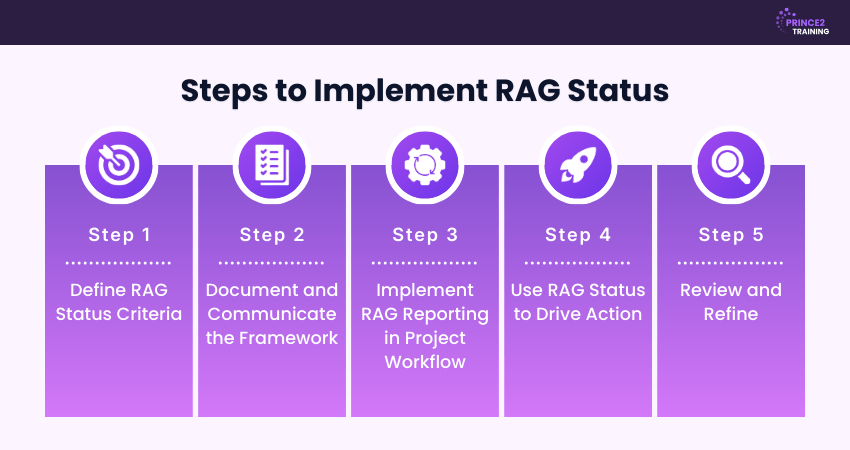
Step 1: Define RAG Status Criteria
To use RAG reporting effectively, you must clearly define what Red, Amber and Green mean for your project team. These are the two common methods for establishing these rules:
a) RAG Scale: This is a straightforward approach that relies on high-level definitions rather than precise figures or tolerances such as percentage delays or budget variance. This method works well for small to medium projects and teams using lightweight reporting.
b) RAG Rating Validation Sheet: This method is more structured and assigns numerical thresholds to each colour. It suits high-risk or tightly governed projects where clarity and precision are essential.
Step 2: Document and Communicate the Framework
After defining your RAG criteria, document them concisely in a single reference. This must include:
a) Purpose: Explain why RAG reporting is used and its value, such as enabling quick visibility of project health.
b) Colour Definitions: Clearly state what each colour represents.
c) Thresholds: Agree on measurable rules and metrics to ensure consistency.
d) Roll-up Rule: Define how individual statuses combine into an overall project colour. Trend indicators can be added to show movement over time.
e) Update Schedule: Set out when data is collected, reviewed, and reported across the week.
f) Ownership: Clarify responsibilities, such as who assigns status and who validates consistency.
g) Escalation Path: Specify when escalation is required and how it should be handled, including communication channels and documentation steps.
h) Storage Location: State where the RAG guide and updates are maintained.
i) One-line Update Format: Provide a short, standard status note for all non-Green items.
Step 3: Implement RAG Reporting in Project Workflow
With the framework in place, team members can start reporting task and project status using colour indicators. This can be done through simple colour-coded tables or by using Project Management tools.
RAG updates should form part of regular reviews, such as weekly meetings or monthly checkpoints. Alongside the colour, include a short narrative explaining key issues, potential impacts, and actions planned for Amber or Red items.
Step 4: Use RAG Status to Drive Action
The real value of RAG reporting comes from the actions it triggers, not the colours themselves. Consider this:
a) For Amber: Project Managers should identify root causes, propose a small number of solutions, select the most suitable option, assign ownership, and set clear deadlines.
b) For Red: Red items require immediate escalation to senior stakeholders. Assemble a focused group to address the issue, protect critical delivery activities, and revise the project plan if required. At least one corrective action should begin within 24 hours.
Step 5: Review and Refine
No RAG framework is perfect from the outset, so regular review is essential. A monthly review can help identify improvements, using questions such as:
a) Were there cases where Green status masked underlying problems?
b) Were actions delivered on time?
c) Were any Red issues unexpected?
d) Did any items remain Amber for an extended period?
During the review, compare reported RAG Statuses with actual project data to identify gaps.
Advance your project leadership and handle more complex project challenges with ease. Sign up for our PRINCE2 Agile® Practitioner Course now!
Benefits of RAG Status Reporting
Understanding RAG Status offers several practical advantages for project teams and stakeholders. Here are some of the advantages:
a) Clarity at a Glance: RAG reporting allows project health to be understood instantly without reviewing lengthy reports. A simple colour indicator shows whether work is on track or needs attention, saving time on presentations and allowing teams to focus on resolving issues.
b) Early Warning: Amber and Red alerts highlight risks before they become major problems. This enables timely intervention, reduces surprises later in the process, and helps avoid costly corrective actions.
c) Better Communication: Using colours creates a shared, easily understood language for both technical and non-technical team members. This removes unnecessary complexity and reduces the risk of misinterpretation.
d) Consistency: RAG provides a standardised method for reporting status across teams and departments. This consistency supports faster reviews and fewer misunderstandings in complex projects.
e) Decision-making Support: Clear visual status indicators help leaders prioritise actions, allocate resources effectively and adjust plans quickly to keep projects on track.
Limitations of RAG Status Reports
While RAG Status is a valuable reporting tool, it's important to understand its limitations. Here are some of the disadvantages of it:
1) Oversimplification
Reducing complex project conditions to three colours can mask underlying challenges and dependencies. Important nuances may be lost when the overall health is summarised too broadly. To address this, teams can introduce greater detail through sub-statuses such as Amber 1, Amber 2, or Red 1, Red 2.
2) Delayed Identification of Issues
RAG reporting may not always reflect emerging problems in real time. Fixed reporting cycles can delay the detection of new risks, especially in fast-paced projects. Introducing interim checkpoints or project milestones can help surface issues earlier.
3) Lack of Context
A single RAG colour rarely explains why a project is in its current state. Without supporting data or stakeholder input, the status can be misleading. Supplementary reports and qualitative insights are essential to provide full context.
4) Inability to Predict Future Issues
RAG Status primarily reflects the current situation and may not reliably forecast future challenges. While it highlights present risks, it may overlook issues that develop later. Combining RAG with forecasting tools can improve decision-making.
5) Overemphasis on Negative Aspects
Projects marked Amber or Red can draw disproportionate attention to problems, potentially overshadowing progress made elsewhere. While addressing the issues is essential, reviewing successful Green projects can provide valuable lessons for managing future challenges.
Example of RAG Status Report
Here's an example of how RAG Status reporting can be applied to a marketing campaign project:
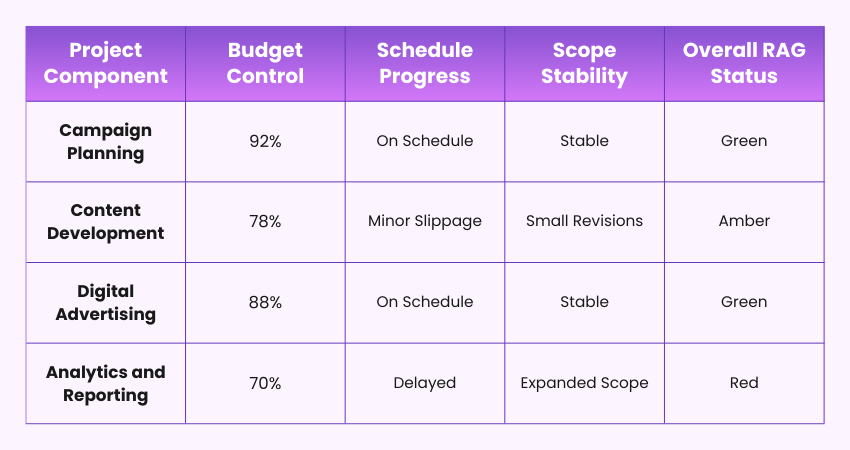
In this example, each project area is reviewed against agreed benchmarks for cost, timeline and scope. Individual RAG ratings highlight the specific concerns, while the overall status provides a clear snapshot of the campaign's health. It identifies where immediate attention is required.
Conclusion
RAG Status works best when it drives action, not just colour-coded reports. With clear criteria, accurate data and regular reviews, it becomes a powerful early-warning system. When implemented well, RAG improves accountability and decision-making across projects. So, use it consistently, review it often and let those colours guide smarter conversations and faster interventions.
Drive Projects with Clarity and Control with our range of PRINCE2® Courses – Register now!



 Continue Browsing