01344203999



 Back
Back


Table of Content

09-Sep-2026

Veronica Davis
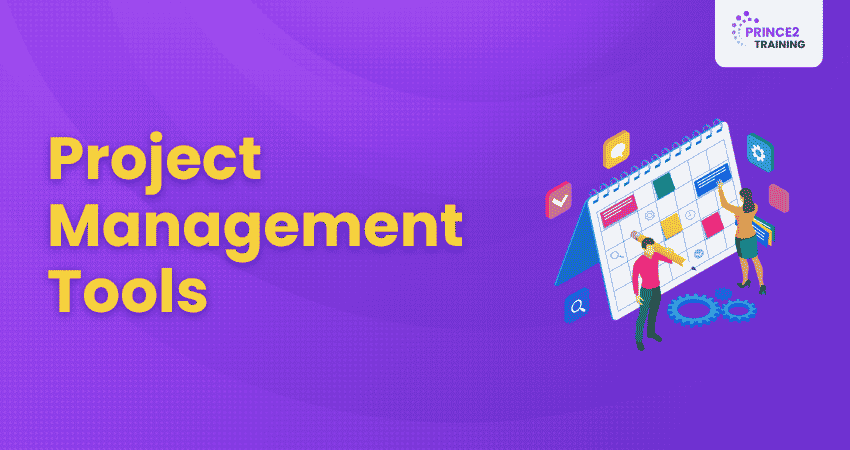
It's every Project Manager's dream to run a project where deadlines never sneak up on you, tasks promptly fall into place, and teams collaborate like a fine-tuned machine. This is exactly where Project Management Tools make a difference!
These tools act as digital lifesavers, turning disorganised work into structured progress and ensuring every task, resource, and deadline is managed with ease. This blog highlights some of the best Project Management Tools, including Jira, Trello, Wrike, and Basecamp, to help you choose the right fit and boost your team's productivity effortlessly.
What are Project Management Tools?
Project Management Tools are software programs that help teams plan, organise, and track the various tasks and resources pertaining to a project. They provide a central platform for assigning tasks, monitoring progress, and working together. Common features of these tools include Gantt charts, Kanban boards, time tracking, and resource allocation, helping teams complete projects on time and within scope.

Why do Companies Need Project Management Software?
Modern businesses manage multiple tasks and deadlines simultaneously. Without a centralised system, communication gaps and workflow confusion can reduce efficiency. This is why organisations use Project Management Software. Key reasons include:
a) Improved Communication:
These software eliminate disjointed communication by centralising team discussions and updates
b) Better Deadline Management:
They help prevent missed deadlines through task tracking, reminders, and scheduling features
c) Efficient Resource Allocation:
They help optimise workloads and team availability for improved productivity
d) Stronger Collaboration:
They improve teamwork through shared dashboards, files, and real-time communication
e) Remote Team Support:
They help remote and global teams work together from a unified digital workspace
f) Better Decision-making:
They enhance reporting, project visibility, and overall business planning
Top Project Management Tools
Project Managers can use free tools for simple projects or advanced software for complex tasks. These tools help with time tracking, project planning, and more. Many options are available, and the following are some of the best:
1) Wrike
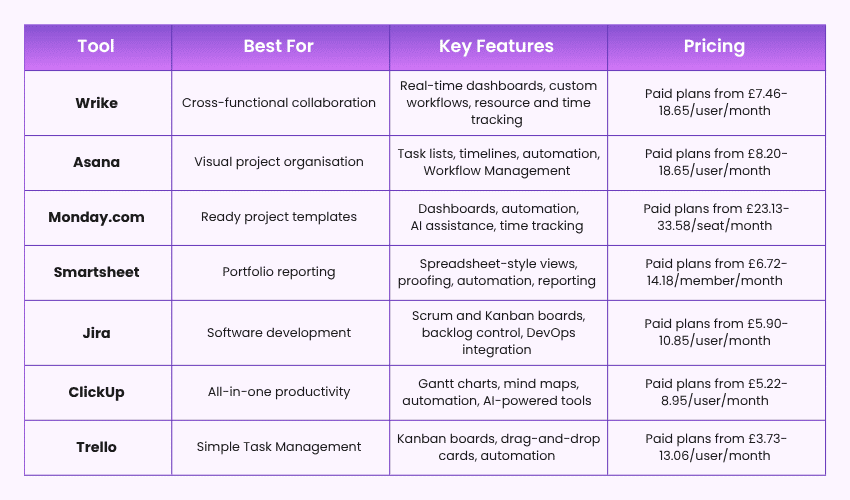
Wrike is a powerful Project Management Tool suitable for both internal teams and external client collaboration. It helps businesses organise complex workflows, manage vendors, and create customised dashboards with detailed reporting features. Its flexible workspace and AI-powered capabilities make project tracking and collaboration more efficient.
Pros:
a) AI-powered Work Intelligence improves productivity and workflow efficiency
b) Supports multiple project views such as Gantt Charts, Kanban Boards, Calendars, and Tables
c) Strong collaboration features including live editing, proofing, and external stakeholder access
d) Highly customisable dashboards and reporting tools
Cons:
a) Advanced features may feel complex for beginners
b) Pricing can become expensive for larger teams
c) Initial setup and customisation may require time
Pricing:
Free plan, Team plan at £7.46/user/month, and Business plan at £18.65/user/month.
2) Asana
Asana is widely recognised for its clean and easy-to-use interface that helps teams manage tasks, monitor deadlines, and improve collaboration. Its intuitive dashboard structure makes navigation simple while offering powerful workflow automation and AI features for Project Management.
Pros:
a) Simple and visually appealing interface suitable for all team sizes
b) Multiple project views including Boards, Timelines, Calendars and Gantt Charts
c) Strong automation capabilities with templates, rules, and forms
d) Supports integration with more than 200 third-party applications
Cons:
a) Advanced reporting features are limited in lower-tier plans
b) Larger projects can become difficult to organise without a proper structure
c) Premium plans may be costly for smaller businesses
Pricing:
Free plan, Starter at £8.20/user/month, and Advanced at £18.65/user/month
3) ClickUp
ClickUp is an all-in-one Project Management Tool designed especially for remote and hybrid teams. With AI-powered tools such as ClickUp Brain and AI Writer for Work, teams can improve collaboration, Task Management, and productivity from a single platform.
Pros:
a) Extensive customisation options for workflows and dashboards
b) Built-in AI features for task summaries, writing, and Project Management
c) Combines Task Management, chat, goals, and documentation in one platform
d) Suitable for both small businesses and large organisations
Cons:
a) A large number of features may feel overwhelming initially
b) Mobile application experience can occasionally feel less smooth
c) Some advanced features are available only in premium plans
Pricing:
Free plan, Unlimited at £5.22/user/month, and Business at £8.95/user/month billed yearly.
Gain practical Agile Project Management skills for real-world project success with the
Agile Project Management Foundation & Practitioner (AgilePM®) Training
– Register now!
4) Trello
Trello is a simple Kanban-based Project Management Tool ideal for visual task tracking and team collaboration. Owned by Atlassian, Trello integrates easily with tools such as Jira and Confluence while providing a straightforward drag-and-drop experience.
Pros:
a) Extremely easy to use and beginner-friendly
b) Excellent visual Task Management using boards, lists, and cards
c) Flexible customisation through custom fields and automation
d) Smooth integration with Atlassian products and third-party tools
Cons:
a) Limited advanced Project Management capabilities compared to competitors
b) Not ideal for highly complex or large-scale projects
c) Reporting and analytics features are relatively basic
Pricing:
Free plan, Standard at £3.73/user/month, Premium at £7.46/user/month, and Enterprise from £13.06/user/month.
5) Notion
Notion is a flexible workspace and Project Management Tool that combines notes, databases, Task Management, and collaboration into a single platform. Its customisable layouts make it suitable for both individuals and teams.
Pros:
a) Clean and minimal interface with excellent flexibility
b) Combines documentation and Project Management in one place
c) Easy drag-and-drop task organisation
d) Affordable pricing for individuals and startups
Cons:
a) Advanced Project Management features are less robust than specialised tools
b) Performance may slow down with large databases
c) Requires setup time to build customised workflows
Pricing:
Free plan, Plus at £7.46/user/month, Business at £11.19/user/month, and Enterprise with custom pricing.
6) Monday
Monday.com is a highly adaptable Project Management platform designed for businesses of all sizes. Its visual dashboards, automation tools, and collaboration features help teams manage projects efficiently while adapting to changing business needs.
Pros:
a) Highly visual and easy-to-use interface
b) Strong workflow automation and AI-powered assistance
c) Wide range of dashboard widgets and project views
d) Excellent collaboration tools including whiteboards and shared documents
Cons:
a) Pricing increases significantly for advanced features
b) Some automation limits apply in lower plans
c) May require training for full customisation capabilities
Pricing:
Limited free options for small teams. Standard at £23.13/seat/month, Pro at £33.58/seat/month, and Enterprise with custom pricing.
7) Adobe Workfront
Adobe Workfront is a comprehensive Project Management Tool designed mainly for creative and marketing teams. Its seamless integration with Adobe Creative Cloud and Experience Cloud helps teams manage creative workflows, automate approvals, and improve collaboration across departments.
Pros:
a) Excellent integration with Adobe Creative Cloud applications
b) Strong workflow automation and task prioritisation features
c) Real-time dashboards help monitor progress and identify bottlenecks
d) Suitable for managing large-scale creative and enterprise projects
Cons:
a) Can be expensive for small businesses or startups
b) Learning curve may be challenging for new users
c) Some advanced configurations require technical knowledge
Pricing:
Adobe Workfront offers custom enterprise pricing based on team size and business requirements. Pricing details are usually available through direct consultation with Adobe.
8) Smartsheet
Smartsheet is a spreadsheet-style Project Management Tool designed for teams that prefer working in familiar grid-based environments. It combines traditional spreadsheets with advanced automation, collaboration, and reporting features.
Pros:
a) Familiar spreadsheet interface makes adoption easier
b) Multiple project views including Gantt Charts, Cards, Calendars, and Grids
c) AI-powered tools for formulas, summaries, and content generation
d) Strong collaboration and document-sharing capabilities
Cons:
a) The interface may feel less modern compared to visual-first tools
b) Advanced features may require additional training
c) Premium pricing for enterprise-level functionality
Pricing:
Smartsheet Pro at £6.72/member/month, Business at £14.18/member/month, and Enterprise with custom pricing.
Develop practical Agile Project Management skills for successful project delivery with the
Agile Project Management Foundation (Agile PM®) Training
– Sign up now!
9) Jira
Jira is a commonly used Agile Project Management Tool, especially popular among software development and IT teams. It helps organisations manage sprints, track issues, automate workflows, and support DevOps collaboration efficiently.
Pros:
a) Excellent Agile and Scrum project support
b) Powerful issue tracking and reporting capabilities
c) Strong workflow automation and DevOps integrations
d) Seamless integration with Atlassian products and developer tools
Cons:
a) Can feel complex for non-technical users
b) Initial configuration may require time and expertis
c) Advanced features can increase overall costs
Pricing:
Free plan, Standard at £5.90/user/month, Premium at £10.85/user/month, and Enterprise with custom pricing.

10) Basecamp
Basecamp is a simple and scalable Project Management Tool designed to improve team communication, task organisation, and project transparency. Its clean interface makes collaboration easier for teams of all sizes.
Pros:
a) Easy-to-use interface with minimal learning curve
b) Strong communication and collaboration features
c) Centralised Task Management with notes and attachments
d) Flat pricing structure suitable for growing teams
Cons:
a) Limited advanced Project Management and reporting features
b) Fewer customisation options compared to competitors
c) Not ideal for highly complex enterprise workflows
Pricing:
Basecamp Plus at £11.19/user/month and Basecamp Pro Unlimited at £223.10/month billed annually or £260.41/month billed monthly.

11) Zoho Projects
Zoho Projects is an affordable and flexible Project Management Tool that integrates smoothly with the wider Zoho ecosystem. It supports Task Management, workflow automation, time tracking, and collaboration for businesses managing complex projects.
Pros:
a) Cost-effective solution for businesses of all sizes
b) Strong integration with Zoho applications and third-party tools
c) Excellent Task Management and workflow automation features
d) Flexible customisation for layouts, templates, and dashboards
Cons:
a) User interface may feel less modern than the competitors
b) Some advanced features have a learning curve
c) Mobile app experience can occasionally feel limited
Pricing:
Free plan, Premium at £2.17/user/month, Enterprise at £4.89/user/month, and Ultimate at £7.61/user/month.
12) Scoro
Scoro is an all-in-one Business Management and Project Management Tool designed for professional service teams. It combines project planning, billing, CRM, reporting, and Resource Management within a single platform.
Pros:
a) Combines Project Management, CRM, billing, and reporting in one system
b) Strong resource planning and financial tracking capabilities
c) Real-time dashboards and detailed business insights
d) Suitable for agencies, consultancies, and service-based businesses
Cons:
a) Higher pricing compared to basic Project Management Tools
b) May feel overwhelming for small teams or beginners
c) Advanced setup may require onboarding support
Pricing:
Scoro Core at £14.85/user/month, Growth at £24.55/user/month, Performance at £37.23/user/month, and Enterprise with custom pricing.
Advance your Agile Project Management career with the Agile Project Management Practitioner Upgrade (Agile PM®) Training – Join now!
Additional Project Management Tools and Techniques
There are some tried and tested techniques that have been turbocharging Project Management for a while. These can be used offline as well as in any kind of digital environment. Let’s explore them in detail:
13) Gantt Charts
A Gantt chart is one of the best visual Project Management techniques that displays a project's schedule over time. It represents tasks as horizontal bars along a timeline, illustrating their start and end dates, durations, and dependencies. This format provides a clear overview of the project's timeline, task sequences, and progress. The key features include:
a) Gantt charts illustrate tasks scheduled over the project duration, allowing for easy comprehension of the project plan.
b) They depict relationships between tasks, showing which tasks depend on others, thus aiding in identifying potential bottlenecks.
c) Significant events or deliverables within the project are marked, helping teams focus on key objectives and deadlines.
d) Gantt charts help distribute workloads evenly and efficiently among team members by visualising who is responsible for each task.
e) They allow for monitoring the completion status of tasks, providing insights into whether the project is on schedule.

14) Work Breakdown Structure (WBS)
A Work Breakdown Structure (WBS) is a hierarchical framework for deconstructing project work into manageable units. Its benefits include:
a) The WBS breaks the project into detailed tasks. It makes complex projects more approachable and manageable.
b) It structures tasks in a top-down approach, from major deliverables to subtasks, for a clear view of task relationships.
c) WBS defines the scope clearly for the stakeholders' clarity.
d) It clarifies accountability and improves team coordination.
e) The detailed breakdown allows for more accurate estimation of resources, time, and costs.
15) Cost Breakdown Structure (CBS)
A CBS is a structured cost-classification framework that summarises all project expenses. Key advantages:
a) It improves budgeting by providing a detailed view of all cost elements.
b) It enables monitoring of actual expenditures against planned budgets, aiding in identifying variances.
c) It supports implementing measures to control costs and optimise resource allocation.
d) It provides stakeholders with a clear view of the project's financial status.
16) Resource Breakdown Structure (RBS)
An RBS is a systematic resource classification framework that organises personnel, materials, equipment and facilities. Key benefits:
a) It identifies all necessary resources and makes sure no critical component is overlooked.
b) It ensures clarity by structuring resources in a top-down manner, from broad categories to specific items.
c) It assists in assigning resources to specific tasks or work packages.
d) It helps you monitor resource usage and availability, thus preventing overallocation or shortages.
e) It supports accurate forecasting of resource needs.
Master the fundamentals of Project Management such as project processes, lifecycles, and best practices in our
CAPM® Certification
- Register now!
17) Project Network Diagrams
Project Network Diagrams are graphical representations depicting the sequence of project activities and their interdependencies. Through nodes that represent tasks and arrows for illustrating relationships, these diagrams clearly visualise the project's workflow. Its key features include the following
a) It clearly displays the order in which tasks should be performed.
b) It highlights relationships between tasks, showing which activities are prerequisites for others.
c) It identifies the longest path through the network, determining the shortest possible project duration.
d) It aids in developing realistic timelines by considering task durations and dependencies.
e) It improves comprehension of how different tasks interconnect.
18) Kanban Boards
Kanban Boards are visual workflow control techniques used to track work from start to completion. Key advantages:
a) It delivers a clear, visual representation of tasks and their statuses within the process.
b) It monitors the advancement of tasks through different stages and identifies bottlenecks.
c) It encourages limiting the number of tasks in progress to maintain focus and efficiency.
d) It makes task statuses transparent to facilitate communication and coordination among team members.
e) It supports iterative refinement of processes.
19) Risk Register
A Risk Register is a comprehensive document used in Project Management to systematically identify, assess, and manage potential risks that could impact a project's objectives. Here are its key features:
a) It catalogues all potential risks that may affect the project.
b) It assesses the potential impact and probability of each identified risk.
c) It designates specific team members responsible for monitoring and managing each risk.
d) It outlines planned responses and strategies to minimise or eliminate the impact of risks.
e) Provides a framework for continuously tracking and updating risk statuses as the project progresses.
Advance your Project Management career through the
Project Management Professional (PMP)® Training
– Join today!
20) Risk Matrix
The Risk Matrix is a technique for assessing and prioritising risks based on their likelihood of occurrence. Plotting the risks on a grid lets you quickly identify which risks require immediate attention. Its key features include the following:
a) A risk matrix plots the risks according to their likelihood and impact through a clear visual representation.
b) It helps rank the risks and focus on those that pose the greatest threat to the project.
c) It helps Project Managers in determining where to allocate resources for risk mitigation.
d) It identifies areas within the project most susceptible to significant risks.
Learn how to align deliverables with evolving project requirements in our
Agile Training
- Sign up now!
21) Timesheets
Timesheets are time-tracking frameworks used to measure effort and utilisation. Key benefits are:
a) It enables precise recording of hours worked by team members.
b) It allows allocation of time entries to specific tasks or projects.
c) It helps differentiate between billable and non-billable hours for accurate client invoicing.
d) It provides insights into time spent on tasks which helps with performance evaluation.
e) Based on logged hours, it facilitates seamless processing of employee compensation.
22) Project Dashboards
Project dashboards are visual reporting frameworks that consolidate project performance metrics. Key benefits:
a) It presents up-to-date information on project performance through real-time visualisation.
b) It allows you to customise dashboard components to display relevant metrics.
c) It monitors task completion rates and milestone achievements.
d) It displays resource utilisation and availability.
e) It identifies potential risks and current issues that impact the project.
23) RACI Chart
A RACI chart, also known as a Responsibility Assignment Matrix, is a tool for defining and clarifying roles and responsibilities in Project Management for tasks, milestones, or decisions. It accomplishes this by categorising stakeholders into four roles:
a) Responsible
b) Accountable
c) Consulted
d) Informed
Here are its key features:
a) It clearly delineates the right person for each task or decision.
b) It improves team communication by setting clear expectations for involvement and information flow.
c) It helps avoid confusion and overlap by assigning specific roles to team members.
d) It ensures accountability by designating a single person as accountable for each task.
e) It assists in effectively allocating resources by identifying who is responsible for what.
24) RAID Log
A RAID log is a potent Project Management Tool that systematically records and tracks the following throughout a project's lifecycle:
a) Risks
b) Assumptions
c) Issues
d) Dependencies
This provides a structured framework to identify, assess, and address factors that can impact a project. Here are its key features:
a) RAID log identifies potential risks and outlines mitigation strategies.
b) It helps in documenting the assumptions made during project planning and execution.
c) It records current problems and tracks their resolution.
d) It identifies and monitors dependencies between tasks or external factors.
e) It provides a comprehensive view of project challenges to inform decision-making.
25) Microsoft Project
With a liquid integration environment, the Microsoft Project Management Tool helps you plan, track and manage projects at your fingertips. Designed to consolidate Microsoft's Project Management Tools, the software excels at single-project Tracking Management. Some of the best features of Microsoft Project are the following:
a) It can be deployed as on-prem or Cloud-based Project Management software.
b) It offers dynamic Schedule Management for project duration, efforts, team strength, etc.
c) You can create dashboards with the help of Power BI to track progress and dependencies
d) It offers smooth integration with the Microsoft 365 tools, Loop, Outlook, Viva Goals, Teams, etc.
Build strong Project Management skills with the CAPM® Certification Training – Register now!
How to Choose the Right Project Management Software for Your Needs?
Choosing the right Project Management Software helps businesses manage projects and collaborate efficiently. Since every organisation has different needs, evaluating your requirements before selecting a platform is important. The following steps can help:
1) Evaluate Your Workflows and Current Processes
Start by reviewing how your team currently manages projects, tasks, communication, and reporting. Identify areas where delays, confusion, or inefficiencies occur. Understanding your existing workflows helps determine what type of software will best support your operations.
2) Identify and List Key Problems and Requirements
Next, identify the main challenges your team faces, such as missed deadlines, poor collaboration, or limited reporting. Then, list the features and capabilities needed to improve project performance, workflow efficiency, and team productivity.
3) Convert Problems and Needs Into Features
After identifying challenges and requirements, convert them into specific software features. For example, communication issues may require messaging and file-sharing tools, while task tracking challenges may need Kanban Boards, Gantt Charts, and automation features.
4) Compile a List of Popular Project Management Tools
Research and compare well-known Project Management platforms that match your business requirements. Compare their features, ease of use, integrations, scalability, customer support, and pricing to understand which tools align best with your goals.
5) Shortlist Options and Begin Testing
Finally, shortlist a few suitable platforms and test them using free trials or demo versions. Involve team members during testing to gather feedback on usability, functionality, and overall performance before making a final decision.
Conclusion
Picking the right Project Management Tools is an essential step in improving the team collaboration process, streamlining workflows, and ensuring project success. By exploring and utilising the various tools outlined in this blog, you can identify the best fit for your team's distinct needs, improving efficiency and productivity.
Build Agile skills to manage projects with greater speed and flexibility with the Agile Training – Register now!
Frequently Asked Questions
What are the 5 C's of Project Management?
The five C’s of Project Management are Communication, Collaboration, Coordination, Control, and Completion. These help teams improve teamwork, manage tasks efficiently, monitor progress, reduce risks and deliver projects successfully within deadlines and budget.
Can Small Businesses Benefit from Project Management Tools?
Yes, small businesses can benefit greatly from Project Management Tools. These tools help organise tasks, improve collaboration, track deadlines, manage resources and increase productivity while reducing workflow confusion and operational delays.
What is the Difference Between Task Management and Project Management Tools?
Task Management Tools focus on organising and tracking individual tasks and daily activities. In contrast, Project Management Tools manage entire projects, including timelines, resources, collaboration, reporting and overall project progress.



 Continue Browsing