Contact@prince2training.co.uk
 01344203999



 Back
Back


Table of Content

17-Sep-2026

David Walter
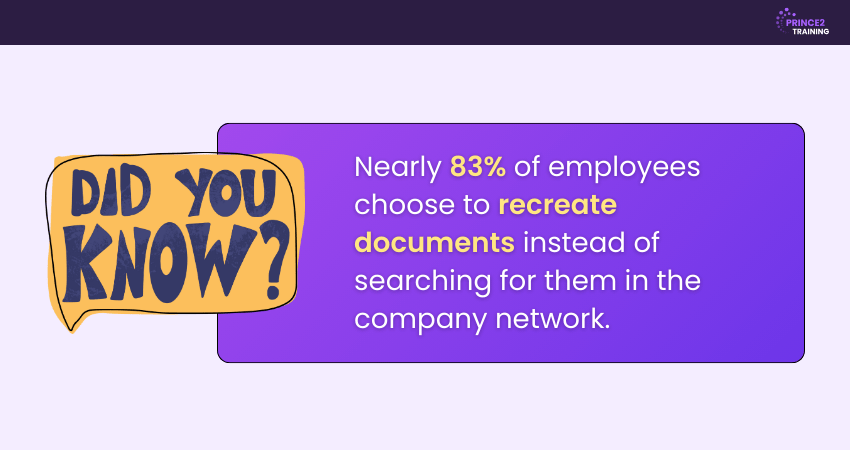
Imagine your team working at full speed, tasks moving forward, and goals within reach. Suddenly, someone spends half an hour searching for the latest project report. By the time it is found, deadlines feel tighter and frustration sets in. This is a common struggle in projects without Proper Document Management.
Project Document Management changes that by keeping everything organised, easy to find, and up to date so your team can focus on delivering results instead of searching for files. In this blog, we will explore what it is, why it matters, and how to make it work for your next big project. Let’s get started!
What is Project Document Management?
Project Document Management is the process of creating, organising, storing, and sharing all the documents linked to a project in a structured way. It ensures that important files are easy to find, always up to date, and safely stored so the project runs smoothly.
It covers everything from project plans, contracts, and reports to meeting notes and checklists. A good system helps the team work together without confusion, avoids mistakes, and keeps track of changes over time. For example, if a project team is working on building a new office, all design files, budgets, and timelines would be stored in one organised place for quick access.

Project Management Document Types
There are different ways that the project details are documented. Based on that, Project Management Documents have different types and below are the most common types:
1) Project Initiation Documents
These documents are created at the beginning of a project to formally define its purpose, objectives, and feasibility. They establish initial scope, identify key stakeholders, and provide official approval to proceed with planning and execution.
1) Project Charter: Formally authorises the project and defines objectives, scope, and key stakeholders.
2) Business Case: Justifies the project by outlining benefits, costs, and expected value.
3) Stakeholder Register: Identifies stakeholders and analyses their influence and interest.
2) Project Planning Documents
Planning documents outline how the project will be executed, monitored, and controlled to achieve its objectives. They define scope, schedule, budget, resources, and risk strategies, providing a clear roadmap for the project team.
1) Project Management Plan: Provides an overall roadmap for how the project will be handled and controlled.
2) Scope Statement: Defines project boundaries, deliverables, and exclusions.
3) Work Breakdown Structure (WBS): Breaks the project into manageable tasks.
4) Schedule and Gantt Chart: Outlines timelines, milestones, and dependencies.
5) Budget Plan: Estimates costs and allocates financial resources.
3) Project Execution Documents
Execution documents support the implementation phase by guiding daily activities and documenting progress. They ensure tasks are assigned, decisions are recorded, and communication remains consistent across stakeholders.
1) Task Assignments: Clarify the roles and responsibilities of those to whom the tasks are assigned.
2) Meeting Minutes: Record discussions, decisions, and action points.
3) Status Reports: Update stakeholders on progress and issues.
4) Project Monitoring and Control Documents
Monitoring and control documents track project performance against planned objectives. They help identify risks, issues, and changes early, enabling corrective measures to keep the project on track.
1) Risk Register: Identifies potential risks and mitigation strategies.
2) Issue Log: Tracks problems and their resolution status.
3) Change Log: Documents requested and approved changes.
4) Performance Reports: Measure progress against scope, schedule, and budget.
5) Project Closure Documents
Closure documents are prepared at the end of a project to formally complete and evaluate it. They confirm deliverables, document lessons learned and ensure a smooth transition or handover to relevant stakeholders.
1) Final Project Report: Summarises outcomes, performance, and deliverables.
2) Lessons Learned Document: Captures insights and improvements for future projects.
3) Project Handover Document: Transfers ownership to operations or clients.
Benefits of Project Document Management
Good documentation is more than just keeping records. It is a key part of successful Project Management that helps teams stay aligned, reduces confusion, and keeps progress moving in the right direction. Here are the benefits of maintaining a proper Project Document Management:
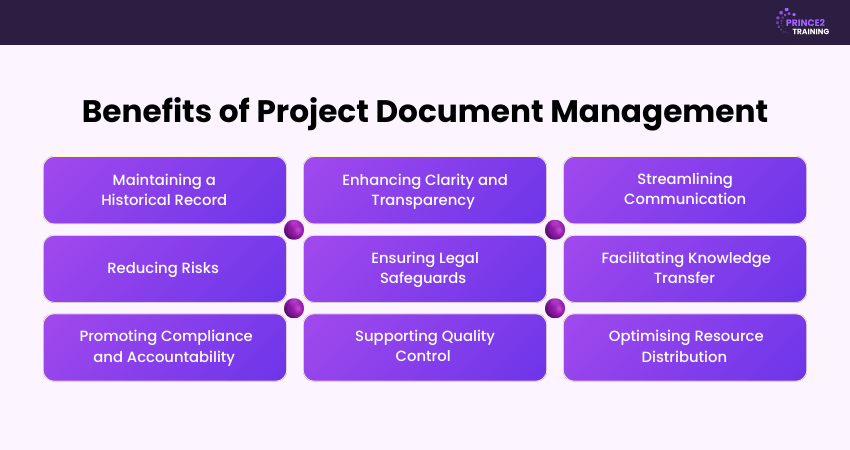
1) Maintaining a Historical Record
Project documents keep a clear record of all decisions, changes, and milestones. This record is helpful for reviews, audits, and solving disputes. It also keeps work on track when team members change. It acts as a reference that guides future projects in the right direction.
2) Enhancing Clarity and Transparency
Clear documentation ensures everyone knows the goals, deadlines, and responsibilities. It helps unite the team, reduces confusion, and keeps stakeholders informed throughout the project. This makes collaboration smoother and avoids misunderstandings.
3) Streamlining Communication
Having one reliable place for information saves time and avoids confusion. Instead of relying only on meetings or verbal updates, the team can quickly find accurate details in the documents. This speeds up decision-making and keeps everyone on the same page.
4) Reducing Risks
Detailed records help spot risks early and plan solutions. By looking at past issues and lessons learned, teams can prevent similar problems in future projects. This leads to fewer delays and better outcomes.
5) Ensuring Legal Safeguards
Contracts, approvals, and records protect the organisation in case of disputes. They provide proof of what was agreed and who was responsible for each decision. This protection gives confidence to both the team and stakeholders.
6) Facilitating Knowledge Transfer
Good documentation makes it easier for new team members to get up to speed. It ensures important details are not lost when someone leaves the team. This reduces training time and helps maintain productivity.
7) Promoting Compliance and Accountability
Project documentation helps meet industry standards and regulations. It also clearly shows who is responsible for each task, making it easier to track progress. This ensures work is done correctly and on time.
8) Supporting Quality Control
Plans, test reports, and checklists help maintain high quality at every stage. They give teams a clear guide to follow and ensure the final result meets expectations. This keeps customer satisfaction high and avoids rework.
9) Optimising Resource Distribution
By recording how time, money, and people are used, managers can make better decisions. This ensures work is balanced, deadlines are met, and budgets are used wisely. It also helps plan resources more effectively for future projects.
Start strong with Introduction to Project Management Training and build project skills for real-world success today!
How to Set Up a Project Document Management System?
A well-organised approach to managing documents ensures that important files are easy to find, secure, and up to date. By setting it up correctly from the start, you can save time, reduce errors, and improve team collaboration. Here are the steps to help you create an effective system.
1) Choose a Reliable Document Management Platform: Begin with a reliable tool that provides version control, secure storage, and collaboration features. Look for cloud-based platforms that allow real-time editing, access control, and seamless integration with your existing systems.
2) Standardise Naming Conventions: Create consistent file and folder naming rules across the project. This avoids confusion, ensures easy searchability, and helps everyone know exactly what each document contains at a glance.
3) Create a Clear Folder Structure: Organise files into well-defined folders such as Planning, Reports, Contracts, and Approvals. A logical hierarchy makes it easier for team members to locate documents quickly and avoid duplicates.
4) Assign Role-based Access Permissions: Control who can view, edit, or share documents by assigning permissions based on team roles. This helps maintain data security and prevents unauthorised changes or accidental deletions.
5) Provide Team Training: Ensure every team member knows how to upload, update, and retrieve documents properly. A brief onboarding or reference guide can prevent mismanagement and promote consistency.
6) Schedule Regular Audits and Reviews: Periodically check the system for outdated, misplaced, or duplicate files. Regular audits keep the documentation relevant and reduce digital clutter over time.
7) Integrate with Project Management Software: Link your document system with your Project Management tools (like Asana or Trello). This enables smoother workflows, automatic file syncing, and better visibility across the project lifecycle.
Blend agility with structure for seamless project delivery success with our PRINCE2 Agile® Foundation Course - Join now!
Best Practices for Project Document Management
A project's success or failure depends on its document management. The following essential procedures will greatly improve your document control strategy:
1) Define Clear Naming Standards
Using clear and consistent file names makes it easier for everyone to find the right document quickly. Avoid confusing names like "Final_v2" or "NewDoc". Instead, include key details such as the project name, document type, and date. For example, use "ClientX_ProjectPlan_2025-07-29" so anyone can understand the file content at a glance.
2) Enable Comprehensive Audit Trails
To monitor document activity, audit trails are crucial. They record when and by whom a file was accessed, edited, or moved. This degree of openness promotes accountability among team members and improves version control. It guarantees that the source can be quickly found in the event that mistakes are made or modifications need to be tracked down.
3) Keep Documents Regularly Updated and Reviewed
Outdated documents can lead to major setbacks. Make it a habit to schedule regular reviews of key files to ensure accuracy and relevance. Assign responsibility for maintaining specific documents and set reminders for updates. This helps maintain compliance, ensures your team always has the latest information, and reduces the risk of incorrect decisions.
4) Create a Centralised Master Folder Structure
Organise all project documents within a single, well-structured digital repository. A centralised structure improves accessibility, maintains order, and ensures team members work from a single source of truth. It also reduces duplication, minimises misplaced files, and strengthens overall document governance throughout the project lifecycle.
5) Add a Table of Contents to all Project Documents
Include a clear table of contents in detailed project documents for easier navigation. This saves time, enhances readability, and helps stakeholders quickly locate key information. It is particularly useful for lengthy reports, policies, and governance documents that require frequent references.
6) Use Clear Version Numbering
Adopt a structured version control system such as v1.0, v1.1, and v2.0 to track document updates. Clear version numbering prevents outdated files from being used and ensures consistency across revisions. It also provides a clear history of document evolution throughout the project lifecycle.
7) Maintain Documents in Electronic Format
Store documents in secure digital platforms rather than relying on paper-based systems. Electronic formats support remote access, real-time collaboration, and efficient backup processes. They also enhance searchability and reduce the risk of physical document loss or damage.
8) Ensure Everyone has Access to the Correct Documents
Providing everyone with timely access to accurate project documents is essential for smooth collaboration and decision-making. Access should be role-based, ensuring team members can view or edit only the documents relevant to their responsibilities while maintaining data security.
Conclusion
The purpose of Project Document Management is to help teams work smarter, not just to store files. With a proper process in place, teams can save time, avoid mistakes, and stay aligned. It provides structure for complex projects and ensures important information is never lost. By following best practices, documentation becomes a consistent habit that supports success at every stage. Start taking steps today to manage your project documents with clarity and confidence.
Advance your leadership with high-impact Project Management skills – Join our Project Management Professional (PMP)® Course now!
Frequently Asked Questions
How to Make a Project Management Document?
Start by defining the project’s objectives, scope, schedule, and key stakeholders. Include risk assessments, budgets, roles, and task lists. Use standard templates and clear formatting, and update the document regularly as the project progresses.
What Types of Documents are Managed in a Project?
Common documents include project plans, contracts, budgets, meeting notes, progress reports, risk registers, and quality checklists. Keeping them organised ensures smooth execution and accountability.
What is the key Principle of Accurate Documentation?
The key principle of accurate documentation is clarity and consistency. Information should be factual, up to date, and free from ambiguity. Every entry must be recorded promptly, using standard formats and terminology. This ensures reliability, supports decision-making, and maintains accountability throughout the project.



 Continue Browsing