Contact@prince2training.co.uk
 01344203999




 Back
Back


Table of Content


24-Aug-2026

Maria Thompson
If you ever feel like tasks are piling up faster than they can be completed, then it’s time to turn to Kanban for some help. A Kanban Board offers a simple way to organise work and keep projects moving smoothly. It’s a visual story of how ideas progress from initial tasks to completed work. With its simple columns and moving cards, it helps teams see exactly where tasks stand at a glance.
In this blog, we'll explore what is a Kanban Board and how it catalyses Workflow Management. So read on and boost your team's productivity!
What is a Kanban Board?
A Kanban Board is a visual tool used to organise and manage work as it moves through different stages of a process. It helps teams track tasks, understand workflow progress, and identify what work needs attention. By presenting tasks visually, teams can quickly see the status of activities and manage their work more efficiently.
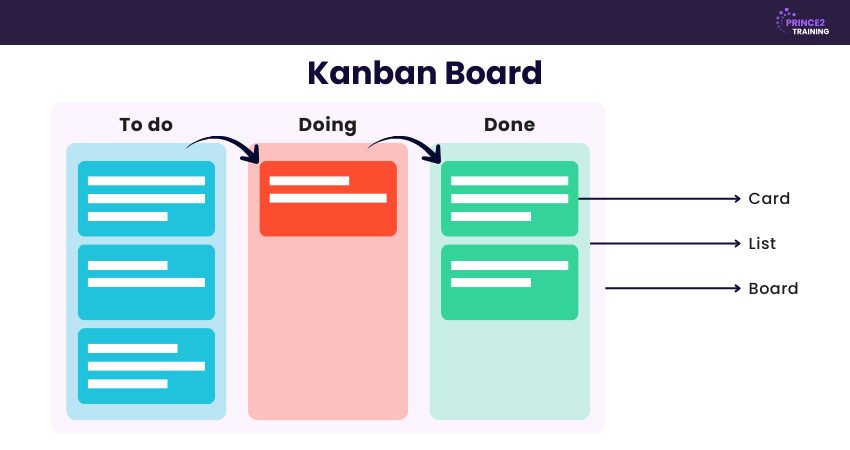
Typically, a Kanban Board is divided into columns such as To Do, In Progress, and Done, with tasks represented as cards that move across the board as work progresses. This simple structure helps teams monitor task flow, identify delays or bottlenecks, and ensure that work moves smoothly from start to completion.

How does a Kanban Board Work?
A Kanban Board works by visually displaying individual tasks as cards that move through different columns on a board. Each column represents a stage in the workflow, showing the sequence of steps a task follows from the start of work to completion. Team members place task cards in the relevant column and move them forward as progress is made.
Different card colours can be used to distinguish various types of work, while horizontal rows, known as swimlanes, help organise tasks for different teams, projects, or priorities. Many Kanban Boards also apply Work in Progress (WIP) limits to specific columns to prevent bottlenecks and maintain a steady workflow. As work advances, team members pull tasks into the next stage, ensuring a continuous and efficient flow.
Key Components of a Kanban Board
A Kanban Board consists of several essential elements that help teams visualise work and maintain a smooth workflow. Typically, there are five core components that’ll help you understand What is a Kanban Board better:
1) Visual Signals
Kanban Boards rely heavily on visual cues, usually in the form of cards, sticky notes, or tickets. Each card represents a specific task or project item. In Agile teams, a card may represent a user story. These visual signals allow team members and stakeholders to quickly understand what tasks are currently being worked on.
2) Columns
Columns represent the different stages of a workflow. Each column reflects a step in the process, and tasks move across these stages until completion. Workflows can be simple, such as "To Do," "In Progress," and "Complete," or more detailed depending on the complexity of the workflow.
3) Work-in-Progress (WIP) Limits
WIP limits define the maximum number of tasks allowed in a column at any given time. For example, if a column has a limit of three, only three cards can remain there simultaneously. When the limit is reached, the team must focus on completing existing tasks before adding new ones. This approach helps identify bottlenecks and improve workflow efficiency.
4) Commitment Point
Many Kanban teams maintain a backlog where ideas and tasks are stored before work begins. The commitment point refers to the moment when a task is selected from the backlog, and the team commits to starting work on it.
5) Delivery Point
The delivery point marks the final stage of the workflow, where the completed product or service is delivered to the customer. The time taken for a task to move from the commitment point to the delivery point is known as Lead Time. Kanban teams continuously aim to reduce this lead time to improve responsiveness.
Build your Project Management mindset from the ground up with our Introduction to Project Management Course - Register now!
How to Create a Kanban Board?
These are the main steps required to create a Kanban Board:
Step 1: Visualise Your Workflow
Start off by using a whiteboard or digital board and map out the entire workflow from the moment work begins until it is completed. Divide this workflow into clear stages and create a column for each stage to represent the process visually.
Step 2: Identify the Types of Work You Do
Outline the different types of tasks your team typically handles, such as customer requests, support tickets or maintenance activities. Assign a specific colour to each type of task and prepare colour-coded sticky notes to represent them.
Step 3: Write Down Tasks on Cards and Place Them on the Board
Write each task down on a separate colour-coded note or card and place it in the appropriate column on the board. Arrange the cards according to priority, making sure that the most important or urgent tasks appear at the top.
Step 4: Start Working with Your Kanban Board
Start working on tasks from the top of the list. As tasks progress, move them to the next column in the workflow and place them at the bottom of that column. This approach helps maintain a steady flow of work across the board.
Step 5: Improve the Flow of Work
Kanban focuses on maintaining a smooth and efficient workflow. Regularly review the board to identify delays, bottlenecks or overloaded stages. Limiting work in progress is one of the most effective ways to keep the tasks moving at a good pace and ensure consistent productivity.
Types and Examples of Kanban Boards
Kanban Boards can be applied across many industries, including manufacturing, human resources, Agile teams, and DevOps environments. Here are the main types of Kanban Boards:
1) Physical Kanban Boards
A Physical Kanban Board is created using a whiteboard, wallboard, or notice board where tasks are represented using sticky notes or cards. Columns are drawn to represent various stages of the workflow, such as To Do, In Progress, and Done. Team members move the cards across the columns as work progresses.
Example:
A software development team working in the same office may use a whiteboard Kanban system where each sticky note represents a task like bug fixes, feature development, or testing. As tasks are completed, the notes are moved across the board to reflect progress.
2) Digital Kanban Boards
A Digital Kanban Board is created using Project Management software, allowing teams to manage tasks online. These boards offer additional features such as task assignment, notifications, file attachments, deadlines, and integration with other tools.
Example:
A remote marketing team may use a Kanban Board in tools such as Trello or Jira to manage activities like Content Planning, Writing, Review, and Publishing. Team members can update tasks in real time, ensuring visibility and collaboration across locations.
Start your Project Management journey with the world's most trusted method. Sign up for our PRINCE2® Foundation Course now!
How to Use a Kanban Board
When a Kanban system becomes overloaded, work begins to slow down and the steady flow of tasks can turn into a bottleneck. One of the strengths of a Kanban Board is that these issues are immediately visible tasks accumulate in the affected columns, making it easy to identify where attention is needed.
The best way to learn Kanban is by creating a board and actively managing work through it. As your team gains experience with the process, you'll become more confident in refining the board’s structure, workflows, and overall design to better support your needs.
Once the team is comfortable with the board, the next step is to leverage Kanban metrics to drive continuous improvement. By tracking measures such as workflow efficiency, quality, throughput, lead time, and cycle time, teams can gain valuable insights into their performances and make data-driven decisions to improve how work is delivered.
How to Create a Kanban Board? Explained in Five Easy Steps
These are the main steps required to create a Kanban Board:
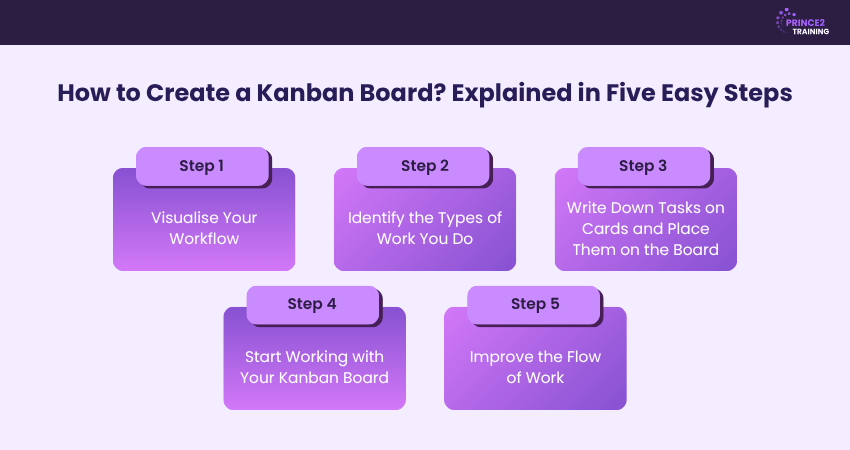
Step 1: Visualise Your Workflow
The first step is to map out the stages that a task typically goes through from start to finish. These stages will become the columns on your Kanban board. A basic workflow often includes columns such as To Do, In Progress, and Done, but you can customise them based on your team's processes.
By visualising the workflow, everyone can clearly understand how work moves through the system and identify where tasks may be getting delayed.
Step 2: Identify the Types of Work You Do
Next, determine the different types of tasks or work items your team handles. These may include feature development, bug fixes, content creation, customer requests, administrative tasks, or any other recurring activities.
Categorising work helps you organise tasks more effectively and provides better visibility into how time and resources are being allocated across projects.
Step 3: Write Down Tasks on Cards and Place Them on the Board
Create a card for every task and place it in the appropriate column on the Kanban board. Each card must include essential details such as the task title, description, priority level, due date, and assigned team member if applicable.
As tasks progress, the cards are moved across the board from one stage to the next, providing a real-time view of project status and team workload.
Step 4: Start Working with Your Kanban Board
Once your board is set up, begin managing work through it. Team members can select tasks from the backlog or "To Do" column and move them into "In Progress" when work begins.
Regularly updating the board ensures everyone stays informed about task status, upcoming priorities, and potential bottlenecks. This transparency improves collaboration and accountability across the team.
Step 5: Improve the Flow of Work
A Kanban Board is most effective when it is continuously reviewed and refined. Monitor how tasks move through the workflow and identify stages where work frequently slows down.
Consider setting work-in-progress (WIP) limits, adjusting workflow stages, or reallocating resources to remove bottlenecks. Continuous improvement helps teams deliver work faster, maintain quality, and increase overall efficiency over time.
What are the Benefits of Using Kanban Boards?
Despite emerging in manufacturing, Kanban's principles are equally beneficial for sales teams, marketing departments, HR functions and many other business areas. Here are its key benefits:
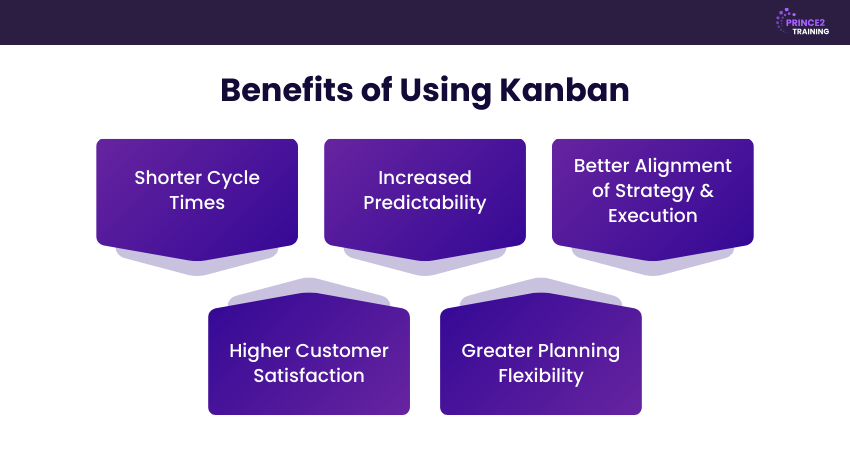
1) Shorter Cycle Times
Cycle time refers to the total time taken from when a task begins until it is completed. Kanban teams often track average cycle time as an important performance indicator because it reflects how efficiently work is progressing.
By analysing cycle times, Project Managers can quickly identify bottlenecks and determine where additional support is needed. Since Kanban boards clearly show who is responsible for each task, Managers can easily find team members with relevant skills who can step in and help keep projects on schedule.
2) Increased Predictability
Regularly monitoring progress on a Kanban board helps teams better estimate how long tasks and projects will take. This improved visibility helps Project Managers allocate resources more effectively, eliminate unnecessary tasks, and create a more streamlined workflow. Greater predictability also supports better coordination with other teams involved in related projects.
3) Better Alignment of Strategy and Execution
In Kanban, new tasks are only added to the backlog if they align with the organisation's strategic priorities. Once included, tasks are prioritised according to importance. This approach makes sure that the teams focus on the most critical activities first. This helps organisations maintain strong alignment between their business objectives and day-to-day work.
4) Higher Customer Satisfaction
By working to reduce cycle times while maintaining quality standards, teams can deliver results more efficiently. Kanban boards clearly outline each stage of work, including testing and review steps, ensuring that quality checks are completed before delivery. As a result, customers receive well-developed solutions more quickly, thus leading to higher satisfaction levels.
5) Greater Planning Flexibility
Kanban allows tasks to be reprioritised whenever necessary. If priorities change, a task can quickly move from the backlog into the active workflow once the team reviews the board. This flexibility enables Project Managers to respond effectively to changes in business needs or customer demands without disrupting the overall workflow.
Lead Modern Projects with the innovative blend of PRINCE2® and Agile in our PRINCE2 Agile® Foundation and Practitioner Course - Register now!
What are Some Examples of Kanban Board?
Kanban boards can be customised to suit different teams and workflows. They use columns to represent stages of work and cards to track tasks as they move from one stage to another.
1) Software Development Kanban Board
A software development team may use a Kanban board with columns such as Backlog, To Do, Development, Testing, Review, and Done. Tasks like feature development, bug fixes, and system updates move through each stage, helping the team monitor progress, identify bottlenecks, and improve workflow visibility.
2) Marketing Campaign Kanban Board
A marketing team can organise campaigns using columns such as Ideas, Planning, Content Creation, Review, Approval, and Published. Each card represents a marketing activity, such as a social media campaign, blog post or email newsletter, allowing the team to track progress and coordinate tasks effectively.
3) Manufacturing Kanban Board
Manufacturing organisations use Kanban Boards to control production flow and inventory movement. A typical board may include stages such as raw materials, production, assembly, quality inspection, packaging, and finished goods. This visual system helps reduce production delays, minimise excess inventory, and ensure materials are available when needed, supporting a more efficient manufacturing process.
Kanban vs Scrum Board
Here are the key distinctions between Kanban and Scrum Board:
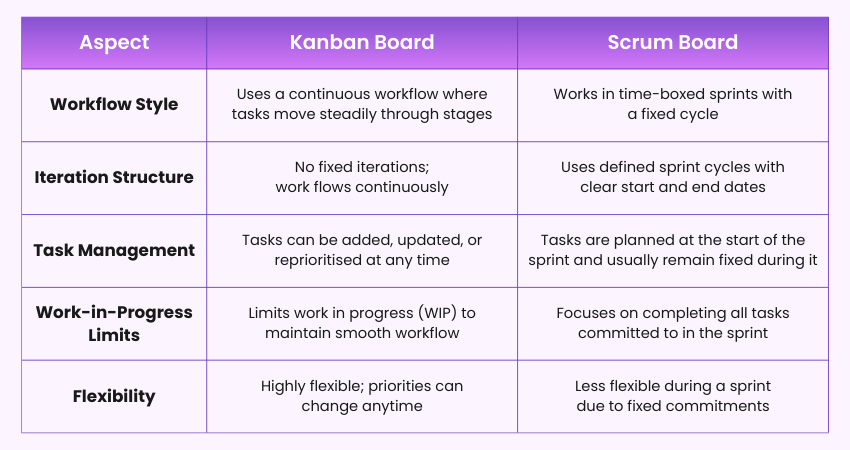
Here are the differences in detail:
1) Workflow Style:
Kanban follows a continuous workflow where tasks move through different stages such as To Do, In Progress, and Done without fixed time limits. In contrast, Scrum organises work into time-boxed sprints, usually lasting two to four weeks, where teams aim to complete a set of planned tasks within that period.
2) Iteration Structure:
Kanban does not follow fixed development cycles. Tasks flow continuously as work progresses. Scrum, however, uses structured sprint iterations with defined start and end dates, allowing teams to deliver a specific set of tasks during each sprint.
3) Task Management:
In a Kanban system, tasks can be added, modified, or reprioritised whenever needed, which allows teams to respond quickly to changes. In Scrum, tasks are typically planned at the beginning of the sprint and remain mostly unchanged until the sprint is completed.
4) Work-in-Progress Limits:
Kanban emphasises limiting the number of tasks that are actively being worked on at any time. These Work-in-Progress (WIP) limits help maintain workflow efficiency and reduce bottlenecks. Scrum focuses more on ensuring that all tasks committed to during a sprint are completed before the sprint ends.
5) Flexibility:
Kanban is highly flexible because priorities can change whenever necessary, and tasks can be adjusted easily. Scrum provides less flexibility during a sprint since the work scope is generally fixed for that sprint cycle to maintain team focus and delivery commitments.
Conclusion
A Kanban Board transforms complex workflows into a clear visual system that helps teams of any size stay organised and productive. By tracking the tasks and limiting work in progress, it carves a smoother pathway from idea to completion. Whether you manage projects, teams or personal tasks, Kanban offers a practical way to work smarter. This makes it a valuable method for maintaining better control over work and improving overall productivity.
Empowering professionals with structured PRINCE2 training to deliver consistent, high‑quality project success. Sign up for our PRINCE2® Training now!
Frequently Asked Questions
What are the Four Principles of Kanban?
The four key principles of Kanban are:
a) Start with what you do now
b) Agree to pursue incremental and evolutionary change
c) Respect current roles, responsibilities, and processes
d) Encourage leadership at all levels of the organisation
What is the Best Kanban Tool?
There is no single top Kanban tool because the right choice depends on a team’s workflow and requirements. Popular digital Kanban tools include Trello, Jira, Asana and Monday.com. These tools provide features such as task cards, workflow stages and progress tracking to support visual Workflow Management.
Is Kanban Lean or Agile?
Kanban originates from Lean Management, focusing on reducing waste, improving workflow efficiency, and delivering continuous value. It is also widely used in Agile environments, especially in Software Development and Project Management. As a result, Kanban is often viewed as a Lean method that complements Agile practices.



 Continue Browsing